DCQCN, Buffer Profiles, and Tuning at Scale
You now have the three primitives: PFC stops the sender, ECN marks early, DCQCN turns ECN signals into rate adjustments. This page is how they fit together in a production fabric — buffer sizing, where to tune first, and how to know what's wrong.
- Sketch the three-layer escalation — below
min_th: silent · between: ECN ramp · abovemax_th: mark all · headroom exhausted: PFC PAUSE. - Read a buffer profile — lossless vs lossy vs storage vs reserved pool shares (the 40/15/20/15 starting point), and which pool feeds PFC headroom.
- Tune in the right order — classify first · verify PFC fires · tune ECN so DCQCN does the work · stress under failure.
- Map a symptom to a knob — unstable AllReduce →
min_thtoo high; PFC everywhere → buffer profile too small or DCQCN off; RDMA timeouts → headroom underprovisioned.
Watch a buffer profile flip in response to real headroom drops — show buffer-profile (current = roce-balanced), find two uplinks bleeding headroom drops, switch to roce-aggressive, then watch the drop counter flatline as the bigger headroom absorbs bursts:
The three-layer control loop
  Switch buffer fills
        │
        ├── below min_th        →  no signal
        ├── min_th < q < max_th →  ECN-mark some packets (DCQCN signal)
        ├── q ≥ max_th          →  ECN-mark all packets (DCQCN hard signal)
        └── headroom exhausted  →  PFC PAUSE (safety net)
The control loop is layered:
- DCQCN does the steady work — receiving CNPs, gently dialing the NIC rate down before queues build.
- PFC is the safety net — if DCQCN can't keep up (a sudden burst, a misconfigured flow), PFC stops the bleeding.
A well-tuned fabric has frequent ECN marks (DCQCN working) and rare PFC pauses (safety net rarely needed). A misconfigured fabric has rare ECN and constant PFC — that's an emergency.
DCQCN as a control loop — the rate math
PFC and ECN are mechanisms; DCQCN is the controller that drives the whole thing. It's a classic fluid control loop, living entirely in the sender NIC (the Reaction Point), with three state variables per queue pair:
- Rc — current rate. What the hardware rate-limiter is actually pacing the QP at right now.
- Rt — target rate. The last rate that was working before the most recent cut — the ceiling to climb back toward.
- α — a smoothed estimate of congestion intensity, from 0 (clear) to 1 (saturated).
On every CNP that arrives (the receiver saw CE and told the sender), the RP cuts:
Rt ← Rc                  # remember where we were
Rc ← Rc × (1 − α/2)      # multiplicative decrease, scaled by α
α  ← (1 − g)·α + g       # nudge α up   (g = small weight, e.g. 1/256)
The elegance is in the α. A single lonely CNP barely dents the rate — α is small, so the cut is tiny. Sustained CNPs drive α toward 1 and the cuts get aggressive. The reaction scales with how bad congestion actually is, instead of TCP's blunt "halve the window on any signal."
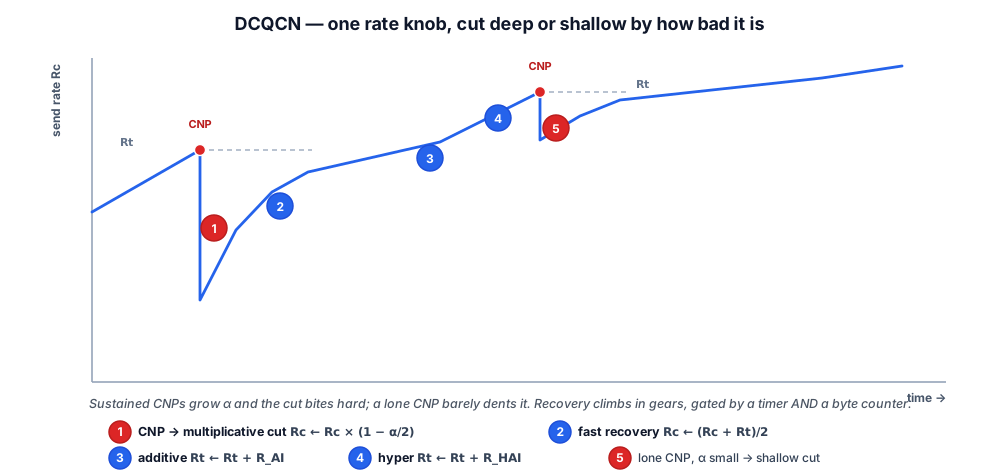
When CNPs stop arriving, α decays (α ← (1 − g)·α, toward 0) and the rate climbs back in three escalating gears:
| Gear | Rule | When it runs |
|---|---|---|
| Fast recovery | Rc ← (Rc + Rt) / 2 | first ~5 cycles — leap halfway back to the last-good target each step |
| Additive increase | Rt ← Rt + R_AI, then Rc ← (Rc + Rt) / 2 | after fast recovery — probe upward by a fixed step (R_AI, tens of Mbps) |
| Hyper increase | Rt ← Rt + R_HAI, then Rc ← (Rc + Rt) / 2 | sustained-clear — ramp hard (R_HAI ≫ R_AI) to reclaim bandwidth |
The climb is gated by two independent clocks — a timer (T) and a byte counter (B). Both have to agree "no congestion lately" before a gear advances. The byte counter makes recovery scale with how much you've sent; the timer makes it scale with wall-clock. Together they keep the loop stable whether the QP is a 10 Mbps trickle or a 400 Gbps blast.
That's why the ECN page's NIC knobs exist and what each one really does: α update interval sets how fast α tracks reality, R_AI / R_HAI set the climb-back aggressiveness, and the fast-recovery count sets how long the NIC trusts the old target before probing higher. Tuning DCQCN is tuning this loop — never knobs in isolation.
Buffer profiles — the foundation
Modern AI switches (NVIDIA Spectrum-4, Broadcom Tomahawk 4/5, Arista 7060X/7800) have shared buffers with multiple pools and per-priority allocations. The buffer profile decides:
- Which traffic classes share which pool
- How much guaranteed buffer each class gets
- How much headroom is reserved for lossless classes (PFC)
- How dynamic the shared pool is (alpha values)
A typical AI-fabric profile splits buffer into:
| Pool | Purpose | Typical share of total |
|---|---|---|
| Lossless (RoCE v2) | Headroom + queue for PFC priority | 40–60% |
| Lossy (management, control) | Best-effort burst absorption | 10–20% |
| Storage | Storage NIC traffic (sometimes also lossless) | 15–25% |
| Reserved | Per-port minimum, telemetry | 10–15% |
Real values depend on the switch silicon. Vendors publish reference profiles (NVIDIA Spectrum-X "AI" profile, Arista R3 profile) — start from these, then tune for your traffic mix.
Field-tested starting values
These are starting points for a 400G RoCE v2 fabric in a 256-GPU pod. Adjust based on your specific switch and workload — don't blindly copy.
Switch WRED (per RoCE priority queue)
| Parameter | 400G fabric | 800G fabric |
|---|---|---|
min_th | 100 KB | 200 KB |
max_th | 1.5 MB | 3 MB |
max_p (max marking prob) | 0.10 | 0.10 |
PFC headroom (per port)
| Cable length | Headroom @ 400G | @ 800G |
|---|---|---|
| 3 m DAC | 2 KB | 4 KB |
| 30 m AOC | 20 KB | 40 KB |
| 100 m fiber | 65 KB | 130 KB |
Most modern switches auto-detect cable length and size headroom automatically. Override only if you know what you're doing.
DCQCN (on the NIC)
| Knob | Typical | When to change |
|---|---|---|
Kmin / Kmax | match switch WRED | Always match |
α update period | 100–200 μs | Decrease if rate cuts too slow |
Rate AI | 5 Mbps | Increase if utilization stays below 80% |
Rate HAI | 50 Mbps | Increase if recovery from pause is slow |
Fast recovery threshold | 5 cycles | Decrease for very bursty workloads |
NVIDIA's reference mlnx_qos script on ConnectX-7 / ConnectX-8 includes defaults that work for most fabrics.
The tuning order
When you stand up a new fabric or change a parameter, tune in this order:
1. Get traffic classified correctly
Verify with packet captures or vendor counters that RoCE v2 traffic is hitting the correct priority queue. Most production debugging issues turn out to be misclassification.
2. Verify PFC works at all
Run a microburst test (use ib_write_bw with multiple QPs from many senders to one receiver). PFC PAUSE frames should appear on the egress that congests. If they don't, PFC is misconfigured.
3. Tune ECN so DCQCN does the work
Start with the reference WRED values. Run a sustained training-like workload. Monitor:
- Switch: ECN marks/sec per port
- NIC: CNPs sent/received
- Application: AllReduce time
If PFC is firing during steady state, lower min_th. If utilization is too low, raise max_th or lower max_p.
4. Verify under failure
Drain one rail, kill one server, induce a microburst. Confirm the fabric stays lossless (no RDMA timeouts) and recovers cleanly when the failure clears.
Symptoms → knobs
A debugging cheat sheet:
| Symptom | Likely knob |
|---|---|
| AllReduce time is unstable (varies 2× step to step) | ECN tuning — min_th too high, DCQCN reacting too late |
| PFC frames frequent on a specific port | Hot spot upstream — check ECMP balance, hash polarization on that port |
| PFC frames everywhere | Buffer profile too small, or DCQCN disabled on the senders |
| RDMA timeouts | Actual drops happening — headroom underprovisioned, or PFC priority misconfigured |
| Utilization low (<60%) but no errors | DCQCN too conservative — raise Rate AI or lower α update period |
| PFC deadlock detected | Topology has a cycle, or watchdog timeout too long. Verify spine-leaf has no loops. |
Vendor differences worth knowing
The same conceptual config translates differently across vendors:
| Function | NVIDIA Spectrum-X | Arista EOS (7060X / 7800) | Cisco NX-OS (Nexus 9000) | Juniper Junos (QFX / PTX) | Broadcom white-box (SONiC) |
|---|---|---|---|---|---|
| Classify | nv set qos roce | class-map → traffic-class | class-map type qos → qos-group | classifiers dscp → forwarding-class | SAI / OpenConfig |
| PFC enable | nv set qos roce pfc | priority-flow-control priority 3 no-drop | priority-flow-control mode on + pause pfc-cos 3 | congestion-notification-profile … pfc | SAI pfc config |
| ECN / WRED | nv set qos roce ecn | qos profile … ecn min/max | random-detect … ecn | drop-profiles + explicit-congestion-notification | Standard SAI / OpenConfig |
| Buffer profile | "AI" profile (supplied) | built-in R3 lossless template | network-qos queue-limit (no one-liner) | shared-buffer / buffer-size | OpenConfig YANG or SONiC config |
| Headroom | Auto from cable detection | Auto + override | Auto + override | Per-class buffer-size | Configure per port |
| Telemetry | NVIDIA Air / DOCA | LANZ, sFlow, gNMI | Streaming telemetry (gNMI / NX-OS Telemetry) | Junos Telemetry Interface (gNMI) | gNMI streaming |
| Adaptive routing | Built-in (Spectrum-X) | DLB (model-dependent) | Dynamic Load Balancing (Silicon One / certain Nexus) | Adaptive flowlet (PTX / certain QFX) | Limited / silicon-dependent |
All five are lossless-capable — the RoCE recipe is identical, only the CLI changes. Where they differ is the AI-fabric extras: Spectrum-X leans on adaptive routing in silicon plus NIC + switch co-tuning; Arista R3 brings deep buffers and open telemetry; Cisco and Juniper bring their own DLB/flowlet variants on the newer silicon; Broadcom-based SONiC white-box is the most open but expects you to tune more by hand. Pick on operational fit and support model, not on a single "best."
Tuning the fabric from scratch because "vendor defaults are too conservative." 90% of "we need custom buffer profiles" investigations end at misclassification — RoCE traffic landing in a lossy queue because the DSCP-to-TC map is wrong on one switch. Always start from the vendor reference (Spectrum-X AI profile, Arista R3, Broadcom SAI reference), and verify classification is correct before you touch a single buffer knob. The first ticket of every new fabric is "RoCE on the wrong priority"; fix that before tuning anything else.
💡 What you should remember
| # | Concept | Why it matters | |
|---|---|---|---|
| 1 | 🪜 | DCQCN does the work; PFC is the safety net | Frequent ECN marks + rare PFC = healthy. Rare ECN + constant PFC = emergency. |
| 2 | 🤝 | Switch WRED must agree with NIC DCQCN | Kmin/Kmax on the switch should match the NIC's reaction thresholds. Mismatched thresholds = wrong control loop. |
| 3 | 📋 | Start from vendor reference profiles | Spectrum-X "AI" profile, Arista R3, Broadcom SAI reference. Tune from these, not instead of them. |
| 4 | 🔢 | Tune in order | Classify → verify PFC fires under microburst → tune ECN so DCQCN does the work → stress under failure. |
| 5 | 🔍 | Misclassification is the #1 bug | RoCE traffic landing in a lossy queue. Always verify with counters or captures before touching buffer knobs. |
| 6 | 📏 | Cable length sets headroom | Auto-detect on modern silicon. Override only if you know what you're doing — DAC/AOC/MMF all have different propagation. |
Next: Host Networking → — drilling into the host side: SR-IOV mechanics, Multus pod attachments, GPU/Network Operator configuration. Or revisit AI Fabric Architecture for the topology context that informs QoS tuning.