What to Monitor
![Chapter hero titled "Execution: Build it, run it, fix it at 3 AM." Cluster topology on the left showing a multi-leaf, multi-spine AI fabric with compute, network, and storage rendered in a blue and green palette. On the right, a system metrics log feed panel scrolling through real production events. Subtitle: the transition from theory to production. Mastering the 15-layer HPC stack and the production provisioning patterns that work at scale. Operations [Phase 6]: inference networking, production operations, comprehensive cluster build guides, bills of materials, and deep-dive incident RCAs.](/assets/images/ops-execution-353361de1cab5fbcece3bf523e280535.webp)
Build it, run it, fix it at 3 AM. This chapter is where everything you learned in Phases 1–5 meets reality.
Standard DC monitoring (link up/down, BGP sessions, interface utilization) is necessary but not sufficient for an AI fabric. The signals that tell you a training job is in trouble are different — and often invisible to traditional NMS tools.
This page is the inventory. The next pages cover what each signal means when it goes bad.
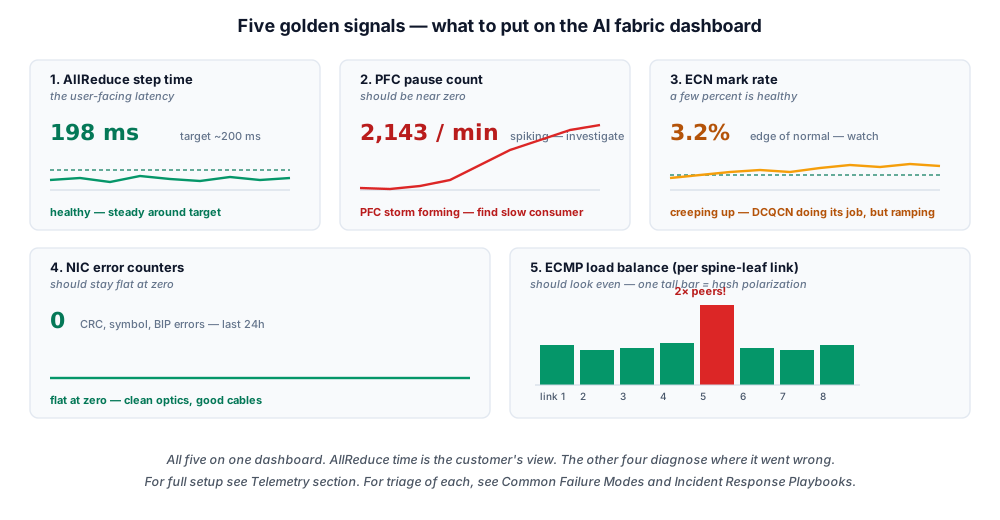
- Name the five golden signals — AllReduce step time, PFC pauses, ECN marks, RDMA NIC errors, and ECMP imbalance, and what good vs. bad looks like for each.
- Build the three dashboards — fabric health, job health, and NIC health, and know which counters belong on each.
- Read RDMA NIC counters —
ethtool -Sforrx_prio3_pause,out_of_buffer_discards,out_of_sequence, andnp_cnp_sent/rp_cnp_handled, and what each one going up means. - Stand up the telemetry pipeline — gNMI/sFlow off the switch, Prometheus off the NIC and NCCL plugin, into Grafana and Alertmanager, with alerts on anomalies not absolutes.
The five golden signals
Borrowing from SRE conventions, the five signals you should have a dashboard for at all times:
1. AllReduce time per training step
This is the customer-facing metric. If AllReduce time goes up, training slows down, real money is being burned.
- Source: training application telemetry (NCCL provides per-step timings; PyTorch / Megatron / Jax log them)
- What good looks like: stable, low variance step-to-step
- What bad looks like: spikes, drift upward over time, large p99/p50 ratio
The network engineer can't see this directly without the training team plumbing it in. Make sure they do.
2. PFC pause frames per port
Per-priority pause counters. Counts go up when a buffer fills.
- Source: switch SNMP / gNMI / OpenConfig telemetry
- What good looks like: zero or near-zero in steady state
- What bad looks like: steady stream of pauses on one or many ports
Frequent PFC = DCQCN isn't doing its job. Investigate ECN tuning, hash polarization, or hot spots.
3. ECN-marked packets per port
How often the switch is marking. The signal DCQCN actually reacts to.
- Source: switch telemetry
- What good looks like: non-zero but bounded — proves ECN/DCQCN is working
- What bad looks like: zero (ECN not configured) or saturated (network is overloaded)
4. RDMA NIC errors per pod / per VF
NIC-side counters: send queue errors, completion queue errors, retransmits, timeouts.
- Source:
ibstat,ethtool -S, vendor telemetry exporters - What good looks like: zero or near-zero
- What bad looks like: non-zero retransmits (sign of drops despite PFC), timeouts (sign of severe issues)
A single retransmit anywhere is a flag.
5. ECMP imbalance / per-link utilization
Are some links carrying 95% of traffic while others sit at 20%? That's hash polarization.
- Source: switch per-interface counters
- What good looks like: even distribution across ECMP members
- What bad looks like: persistent imbalance, especially on specific 5-tuple flows
The dashboards you should have
Three dashboards, all should be visible to the on-call engineer at a glance:
Dashboard 1: Fabric health (network engineer view)
- Per-port utilization (heatmap or top-N)
- PFC pauses/sec, by port and direction
- ECN marks/sec, by port
- BGP session status (any flapping?)
- Optical levels (light getting weak?)
- Buffer occupancy peaks (which queue is filling?)
Dashboard 2: Job health (training team view)
- AllReduce time per step (current job, last hour)
- Network-attributed time (NCCL provides this with debug instrumentation)
- GPU idle time (proxy for "waiting on network")
- Per-rank throughput variance (which rank is slowest?)
Dashboard 3: NIC health
- Per-NIC retransmit counters
- Per-NIC completion queue errors
- Per-VF (in k8s) error counters
- Driver versions (mismatch is a common bug)
What you'll find in NIC counters
NIC counters are gold. Modern RDMA NICs expose hundreds of them — these are the ones to actually watch:
ethtool -S enp01s0 | grep -E "(rx_prio|tx_prio|out_of_buffer|out_of_sequence|timeout|cnp)"
Key counters and what they mean:
| Counter | Going up means |
|---|---|
rx_prio3_pause / tx_prio3_pause | PFC pauses received/sent on RoCE priority |
out_of_buffer_discards | Receive buffer overflowed — fabric is broken somehow |
out_of_sequence | Packets arriving out of order — usually adaptive routing or multipath |
port_xmit_wait | Transmitter is waiting (paused or backpressured) |
port_rcv_packets / port_xmit_packets | Counter sanity check |
np_cnp_sent / rp_cnp_handled | DCQCN signals — actively working |
Build a script that polls these every 10 seconds and exports to Prometheus. Set alerts on anomalies.
What about the training framework's view?
You also need the training-framework-side telemetry. NCCL with NCCL_DEBUG=INFO logs every send/receive timing. Most production training jobs have:
- Custom NCCL plugin or wrapper that emits per-step timings to a metrics endpoint
- Per-rank latency histograms (which GPU is slowest? where?)
- KV-cache stats if inference
This is the training team's responsibility, but you should know how to read it.
Telemetry export pipelines
The pipeline that gets all this into Prometheus or your TSDB:
Switch  ──gNMI/sFlow──┐
                       ├──→  Telemetry collector (gNMI-collector / sFlow-rt)
NIC counters  ─Prom────┘                       │
(node_exporter / DCGM)                          │
                                                ▼
Training framework  ──Prom──────→ Prometheus  ──→ Grafana
(NCCL plugin)
                                                ▼
                                              Alertmanager  →  PagerDuty
Most large operators have a custom collector for switch telemetry (gNMI is the modern standard), and every switch vendor exposes it:
- NVIDIA Spectrum-X ships a collector via NVIDIA DOCA.
- Broadcom Tomahawk white-box switches expose gNMI through the SONiC stack — it's built in, no vendor agent required.
- On the host side, the source is vendor-specific too: NVIDIA GPUs report via DCGM, AMD GPUs via
rocm-smi, and the RDMA NIC counters are vendor-neutral —ethtool -Sand the standard RDMA HCA counters (the OFED /rdma-corecounter set) read the same whether the NIC is Mellanox, Broadcom, or Intel.
💡 What you should remember
| # | Concept | Why it matters | |
|---|---|---|---|
| 1 | 📊 | Five golden signals: | AllReduce time, PFC pauses, ECN marks, NIC errors, ECMP balance. |
| 2 | 🖥️ | Three dashboards: | fabric health, job health, NIC health. All visible at a glance. |
| 3 | 🔌 | NIC counters are gold | ethtool -S shows the hundreds of useful ones. |
| 4 | 🧠 | Training framework telemetry | is your customer view. Insist on it being plumbed in. |
| 5 | 📡 | gNMI is the modern switch telemetry protocol. | sFlow is the old standard. SNMP is barely sufficient. |
| 6 | ⚠️ | Set alerts on anomalies, not absolutes | what matters is sudden changes from baseline. |
Next: Common Failure Modes → — the actual failures you'll see, what they look like in the telemetry, and how to triage them.