Kernel Tuning for RDMA
A vanilla Linux install can't do RDMA at 400 G. The pieces required for RDMA — IOMMU, hugepages, a modern NIC driver, the right kernel parameters — have to be configured deliberately. This page is the kernel side of the chain that lets a pod actually use RDMA.
Watch the five-knob sequence — kernel cmdline → hugepages → IOMMU groups → ring buffers → sysctls — running end-to-end on the rockynet lab simulator:
- Build the kernel command line for RDMA —
intel_iommu=on/amd_iommu=on,iommu=pt, anddefault_hugepagesz=1G hugepages=64, then verify with/proc/cmdlineandgrep Huge /proc/meminfo. - Explain why IOMMU + ACS = safe SR-IOV — check
ls /sys/kernel/iommu_groups/, spot VFs sharing a group, and fix it in BIOS so multi-tenant passthrough actually works. - Stand up the NIC + VF chain — load the RDMA driver for your vendor (
mlx5,bnxt_re, orirdma), confirmrdma linkshowsACTIVE, create VFs viasriov_numvfs, and persist them with a systemd unit. - Tune the host knobs that matter — enable DCQCN per-NIC via sysfs (
roce_np/roce_rp), set thenet.core.*buffer sysctls andrp_filter = 2for multi-rail, and pin GPU + NIC to the same NUMA node.
The whole chain on one page — each layer of the host stack and the knob that configures it. The thing to internalize: the RDMA data path bypasses the kernel TCP/IP stack, so most net.core / tcp_* sysctls you'd reach for don't move RDMA throughput. Hugepages and IOMMU do.
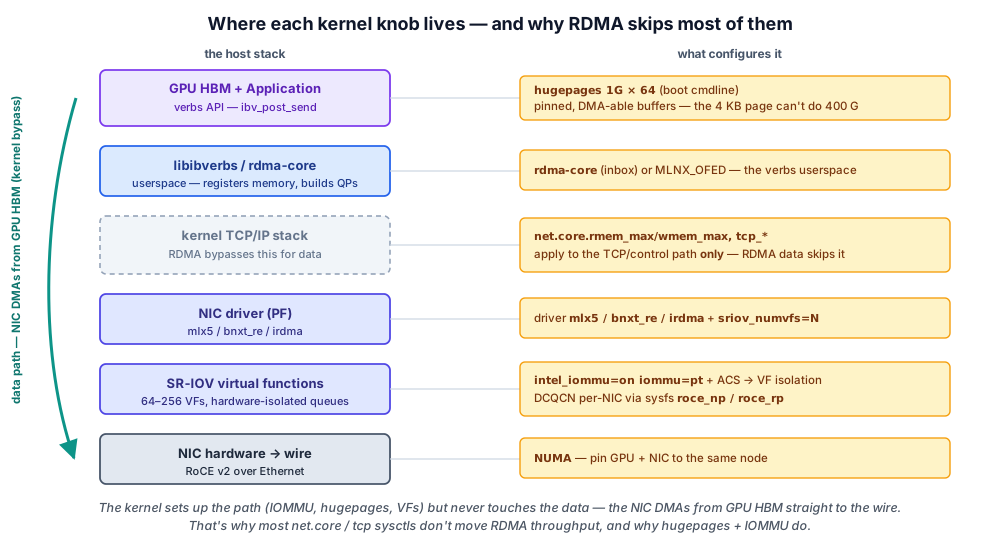
The kernel command line
Edit /etc/default/grub, change GRUB_CMDLINE_LINUX, then run update-grub (Debian/Ubuntu) or grub2-mkconfig -o /boot/grub2/grub.cfg (RHEL family), then reboot.
For an AI training host on Intel:
GRUB_CMDLINE_LINUX="intel_iommu=on iommu=pt default_hugepagesz=1G hugepagesz=1G hugepages=64 isolcpus=0-31 nohz_full=0-31 rcu_nocbs=0-31"
For AMD: amd_iommu=on iommu=pt.
What each flag does:
| Flag | Why |
|---|---|
intel_iommu=on / amd_iommu=on | Enables the IOMMU driver — required for any SR-IOV VF passthrough |
iommu=pt | Passthrough mode — host PFs go direct, only VFs use IOMMU mappings (faster) |
default_hugepagesz=1G hugepagesz=1G hugepages=64 | Reserves 64 × 1 GB hugepages (64 GB) at boot for DMA-able buffers |
isolcpus=0-31 | Reserves cores 0-31 for the application — kernel scheduler won't put other work there |
nohz_full=0-31 | Disables the kernel tick on isolated cores (less jitter for tight RDMA loops) |
rcu_nocbs=0-31 | Moves RCU callbacks off isolated cores (more jitter reduction) |
Verify after reboot:
cat /proc/cmdline                          # confirm flags applied
dmesg | grep -i iommu                      # should show "IOMMU enabled"
cat /proc/meminfo | grep Huge              # should show 64 1G hugepages
If /proc/meminfo shows 0 hugepages, the system couldn't allocate them at boot — usually means another flag is wrong or memory was already fragmented. Try transparent_hugepage=never as an additional flag.
IOMMU and why ACS matters
The IOMMU (I/O Memory Management Unit) is the chip-level enforcement that says "this PCIe device can DMA into this memory and only this memory." Without it, any device with DMA can write anywhere in RAM.
ACS (Access Control Services) is a PCIe feature that lets the IOMMU isolate downstream devices from each other. Without ACS:
- Multiple VFs end up in the same IOMMU group
- They can't be safely assigned to different VMs/containers
- SR-IOV effectively doesn't work for multi-tenant use
To check your server's PCIe topology:
lspci -t                         # show the tree
ls /sys/kernel/iommu_groups/     # list IOMMU groups
# Each VF should be in its own group, or grouped only with related PF
If multiple VFs are in one group, ACS is off — check BIOS, enable VT-d/IOMMU, enable ACS, reboot. Some BIOSes hide ACS behind "PCI Express" → "Access Control Services" or similar.
Hugepages and why
DMA at 400 G needs large contiguous physical memory regions. The default Linux 4 KB page is too small — registering a 1 GB buffer would require 250,000 mappings.
Hugepages are 2 MB or 1 GB physical pages. Reserving 64 × 1 GB at boot means the kernel won't fragment that memory, and the RDMA NIC can DMA into it with way fewer mappings.
The 1 GB hugepages need to be reserved at boot (the kernel can't reliably find 64 contiguous GBs in fragmented memory).
# Verify
cat /proc/meminfo | grep HugePages_Total      # should be 64
cat /sys/devices/system/node/node0/hugepages/hugepages-1048576kB/nr_hugepages
For applications to use them, they have to mount or mmap from /dev/hugepages (handled by the runtime — for k8s pods, hugepages-1Gi in resources.limits).
The NIC driver
Modern RDMA NICs each have their own kernel driver — which one you load depends on the silicon in the box:
| Driver | NIC | Vendor |
|---|---|---|
mlx5 | ConnectX-7/8, BlueField | NVIDIA / Mellanox |
bnxt_re | Thor / Thor2 (400G/800G RoCE v2) | Broadcom |
irdma | E810 (RoCE v2 + iWARP) | Intel |
Install via:
# Distro inbox path — works for all three vendors
apt install rdma-core libibverbs-dev libibverbs-utils

# NVIDIA/Mellanox bundled OFED (a.k.a. MLNX_OFED / "NVIDIA OFED") — mlx5 only
./mlnxofedinstall --upstream-libs --dpdk
rdma-core is the upstream OpenFabrics userspace and ships in every distro — that's the NIC-agnostic path and it covers Broadcom and Intel out of the box. NVIDIA packages its own bundle (MLNX_OFED) for the mlx5 family; Broadcom and Intel rely on inbox rdma-core plus, when needed, a vendor kernel-module package (bnxt_re / irdma DKMS).
Or — and this is the recommended path for k8s with Mellanox NICs — let the NVIDIA Network Operator install the mlx5 + OFED stack via a DaemonSet. This is what production Mellanox clusters use because driver-versus-kernel-version compatibility is a pain to manage by hand. (For Broadcom/Intel NICs you stay on inbox rdma-core or the vendor package instead.)
After install, verify:
lsmod | grep -E "mlx5|bnxt_re|irdma|ib_"   # NIC driver + RDMA modules loaded
rdma link                                  # RDMA devices visible
ibstat                                     # per-device state
ibv_devinfo                                # detailed per-device info
Each port should appear as an mlx5_N / bnxt_re_N / irdma_N RDMA device, link state ACTIVE.
SR-IOV — creating VFs
Once the driver is loaded and you've confirmed PFs are working, create VFs:
# 32 VFs on the first NIC port
echo 32 > /sys/class/net/enp1s0/device/sriov_numvfs

# Verify
ls /sys/class/net/enp1s0/device/virtfn*    # one entry per VF
lspci | grep -i "Mellanox\|Connect"        # PFs + VFs visible
Persistence: the sriov_numvfs setting doesn't survive reboot. You need a systemd unit, udev rule, or boot script:
# /etc/systemd/system/sriov-numvfs.service
[Unit]
Description=Configure SR-IOV VFs
After=network-pre.target

[Service]
Type=oneshot
ExecStart=/bin/bash -c 'echo 32 > /sys/class/net/enp1s0/device/sriov_numvfs'
ExecStart=/bin/bash -c 'echo 32 > /sys/class/net/enp2s0/device/sriov_numvfs'
# ... repeat for all 8 NICs

[Install]
WantedBy=multi-user.target
In a k8s cluster with the SR-IOV Network Operator, this is handled declaratively via a SriovNetworkNodePolicy.
DCQCN — the RDMA congestion-control config
DCQCN runs on the NIC, but you enable it via sysfs from Linux:
# Trust DSCP (so the NIC reads QoS from incoming packets)
mlnx_qos -i enp1s0 --trust dscp

# Enable Notification Point (generate CNPs for incoming CE-marked packets)
echo 1 > /sys/class/net/enp1s0/ecn/roce_np/enable/3

# Enable Reaction Point (react to CNPs by dialing back rate)
echo 1 > /sys/class/net/enp1s0/ecn/roce_rp/enable/3

# Repeat for every NIC interface
Without DCQCN enabled, PFC has to do all the work — and that means head-of-line blocking the moment any flow exceeds capacity.
Sysctl knobs worth knowing
A few /etc/sysctl.conf settings that AI hosts often tune:
# Buffer sizes — bigger for high-bandwidth
net.core.rmem_max = 268435456
net.core.wmem_max = 268435456
net.core.rmem_default = 16777216
net.core.wmem_default = 16777216
net.core.netdev_max_backlog = 250000

# Don't reduce performance on background traffic
net.core.somaxconn = 65535

# TCP — only matters for the eth0 mgmt path
net.ipv4.tcp_window_scaling = 1
net.ipv4.tcp_timestamps = 1
net.ipv4.tcp_congestion_control = bbr

# Routing — multiple rails
net.ipv4.conf.all.rp_filter = 2     # loose mode (not strict) for multi-rail
Apply with sysctl -p. Most of these don't affect RDMA performance directly (RDMA bypasses the kernel stack) but they do affect the eth0 management path and any TCP traffic.
NUMA awareness
Modern AI servers have multiple NUMA nodes (typically 2). GPUs and NICs are wired to specific NUMA nodes. Cross-NUMA RDMA pays a latency tax and reduces throughput.
# Show NUMA topology
numactl --hardware

# Show which NUMA each NIC is on
cat /sys/class/net/enp1s0/device/numa_node

# Show which NUMA each GPU is on
nvidia-smi topo -m
In Kubernetes, the Topology Manager enforces GPU + NIC on the same NUMA node when scheduling pods. Set topologyManagerPolicy: single-numa-node in kubelet config and cpuManagerPolicy: static.
Verifying everything is alive
After all the kernel-side config, run this checklist:
# 1. IOMMU enabled
dmesg | grep -i iommu | head -5

# 2. Hugepages reserved
grep Huge /proc/meminfo

# 3. RDMA driver loaded
lsmod | grep -E "mlx5|bnxt_re|irdma|ib_"

# 4. RDMA devices visible
rdma link

# 5. VFs created
lspci | grep -iE "mellanox|broadcom|intel|connect" | head -10

# 6. DCQCN enabled
cat /sys/class/net/enp1s0/ecn/roce_rp/enable/3   # should be 1

# 7. NIC at expected speed
ethtool enp1s0 | grep Speed
Every line should produce a sensible output. If any is empty or wrong, fix that before moving on.
💡 What you should remember
| # | Concept | Why it matters | |
|---|---|---|---|
| 1 | 🧱 | Kernel cmdline is the foundation. | iommu=on, iommu=pt, hugepages — all required. |
| 2 | 🚫 | IOMMU + ACS | = safe SR-IOV. Without ACS, VFs aren't isolated. |
| 3 | 📦 | 64 × 1 GB hugepages | = reserved at boot for DMA-able RDMA buffers. |
| 4 | 🔌 | The NIC driver chain | (the vendor driver — mlx5, bnxt_re, or irdma — plus rdma_cm, ib_uverbs) has to be loaded for RDMA to work. |
| 5 | 🔁 | DCQCN is enabled on every NIC | via sysfs — don't forget this in production. |
| 6 | 🧠 | NUMA awareness matters | GPU + NIC on the same NUMA, enforced by k8s Topology Manager. |
Next: Debugging Tools You'll Use → — the ten Linux commands that 90% of host-side debugging boils down to.