Operators and Helm
You've installed kubernetes. You've installed Multus + SR-IOV CNI. But you don't yet have a working AI cluster — because the GPU drivers, the OFED driver, the device plugins, the topology discovery, and the SR-IOV inventory aren't set up.
That's the job of Operators. This page is what they are, the ones you'll install, and how to use Helm to deploy them.
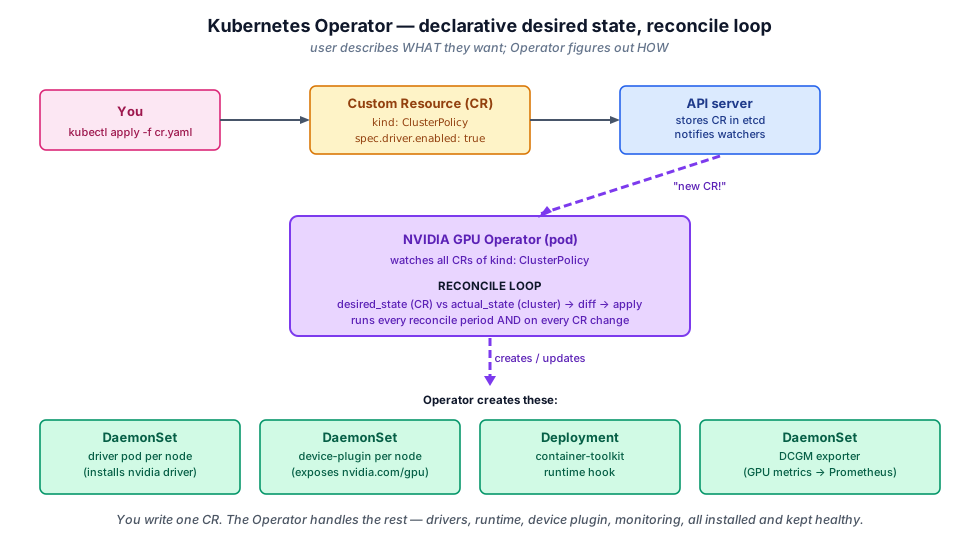
- Explain the Operator pattern — a CRD (e.g.
ClusterPolicy) plus a controller pod whose reconcile loop installs drivers, runtimes, and device plugins via DaemonSets and corrects drift automatically. - Name the three load-bearing AI Operators — a GPU Operator (NVIDIA's, or the AMD GPU Operator for ROCm), the NVIDIA Network Operator (OFED + RDMA device plugin, Mellanox-specific), and the vendor-agnostic SR-IOV Network Operator (VF inventory + NADs).
- Drive Helm —
helm repo add,helm install/upgrade/list/uninstall, and customize a chart throughvalues.yamlinstead of hand-editing deployed YAML. - Debug Operator-managed components — read DaemonSet pod logs, check the CR
statusviakubectl describe, and map symptoms like a missingnvidia.com/gpuresource orCrashLoopBackOffdriver pod to a root cause.
What an Operator is
A Kubernetes Operator is a controller that manages a complex software stack as if it were a single k8s resource.
Without an Operator, installing the NVIDIA driver on every node looks like:
- SSH into every node
dpkg -i nvidia-driver-*.deb- Reboot
- Hope nothing breaks
- Repeat in 6 months when you upgrade
With the NVIDIA GPU Operator, it looks like:
helm install gpu-operator nvidia/gpu-operator- The Operator deploys a DaemonSet to every node
- The DaemonSet installs the driver, the container runtime hook, the Device Plugin, DCGM exporter
- The Operator monitors them; if a node's driver gets out of sync, it fixes it
- Upgrading is a one-line Helm change
The Operator pattern is declarative — you describe what state you want, the Operator makes it true and keeps it true.
Internally, an Operator is:
- A Custom Resource Definition (CRD) that defines a new k8s resource type (e.g.,
ClusterPolicy) - A Controller (a pod that runs continuously) that watches that resource and acts on it
Operators are how complex software (databases, ML pipelines, drivers) gets packaged for k8s. There are hundreds of them; AI clusters use a specific handful.
The Operators you'll meet on an AI cluster
| Operator | What it manages | When to install |
|---|---|---|
| NVIDIA GPU Operator | NVIDIA driver, container toolkit, Device Plugin, DCGM exporter, Node Feature Discovery | Every cluster with NVIDIA GPUs |
| AMD GPU Operator / device plugin | ROCm driver, container runtime, amd.com/gpu device plugin (younger project than NVIDIA's) | Clusters with AMD Instinct GPUs |
| NVIDIA Network Operator | Mellanox OFED driver, RDMA shared device plugin, IB-K8s, kernel modules — mlx5/Mellanox-specific | Mellanox RDMA NIC clusters (Broadcom/Intel use inbox rdma-core) |
| SR-IOV Network Operator | VF inventory, NetworkAttachmentDefinitions, SR-IOV CNI | Every cluster doing SR-IOV (= every AI cluster) — vendor-agnostic for VF management |
| Node Feature Discovery (NFD) | Labels nodes with hardware features (CPU model, NUMA topology, NIC count) | Always; comes with GPU Operator |
| Volcano | Batch job scheduler with gang scheduling | If you're running multi-node training |
| Prometheus Operator | Telemetry (metrics) | For monitoring |
| Grafana Operator | Dashboards | For visualizing telemetry |
The load-bearing trio is a GPU Operator + the Network Operator + the SR-IOV Operator. Without them, you'd be managing drivers and CNI configs by hand on hundreds of nodes — error-prone, slow, and a source of constant production debugging.
The NVIDIA GPU Operator manages NVIDIA GPUs only — AMD ships its own AMD GPU Operator / device plugin for Instinct GPUs (a younger project), and Intel has its own device plugins. The NVIDIA Network Operator is Mellanox-OFED-specific (mlx5); Broadcom (bnxt_re) and Intel (irdma) NICs run on inbox rdma-core rather than this Operator. The SR-IOV Network Operator, by contrast, is vendor-agnostic — it manages VFs the same way regardless of who made the NIC.
Walk the bootstrap live
Watch a stock K8s cluster turn into an AI-ready one in 50 seconds — helm install the GPU Operator, then the Network Operator, then a NicClusterPolicy. Final kubectl describe node shows 8 GPUs + 63 RDMA slots advertised:
Helm — the package manager
Helm is the package manager for k8s. A Helm chart is a templatized bundle of k8s YAML — Operators, Deployments, Services, ConfigMaps, all parameterized.
Installing Helm
curl https://baltocdn.com/helm/signing.asc | sudo apt-key add -
echo "deb https://baltocdn.com/helm/stable/debian/ all main" | sudo tee /etc/apt/sources.list.d/helm-stable-debian.list
sudo apt update && sudo apt install helm
(Or brew install helm on macOS / a release binary on RHEL.)
Using Helm
# Add a repository
helm repo add nvidia https://helm.ngc.nvidia.com/nvidia
helm repo update

# Install a chart with default values
helm install gpu-operator nvidia/gpu-operator -n gpu-operator --create-namespace

# Install with custom values (production)
helm install gpu-operator nvidia/gpu-operator \
   -n gpu-operator --create-namespace \
   --version v24.9.1 \
   -f my-values.yaml

# List what's installed
helm list -A

# Upgrade
helm upgrade gpu-operator nvidia/gpu-operator -n gpu-operator --version v24.10.0

# Uninstall
helm uninstall gpu-operator -n gpu-operator
The my-values.yaml file overrides chart defaults — driver version, image registry, feature toggles, etc. Every chart publishes its values.yaml reference so you can see what's configurable.
A concrete walkthrough: installing the GPU Operator
Step by step:
# 1. Add the NVIDIA Helm repo
helm repo add nvidia https://helm.ngc.nvidia.com/nvidia
helm repo update

# 2. Create a values file with what you want to customize
cat > gpu-operator-values.yaml <<EOF
driver:
  enabled: true
  version: "550.90.07"
toolkit:
  enabled: true
devicePlugin:
  enabled: true
dcgmExporter:
  enabled: true
nfd:
  enabled: true
mig:
  strategy: none
EOF

# 3. Install
helm install gpu-operator nvidia/gpu-operator \
   -n gpu-operator --create-namespace \
   -f gpu-operator-values.yaml

# 4. Wait for everything to come up
kubectl get pods -n gpu-operator -w
Within 5-10 minutes you should see a long list of pods all in Running state:
gpu-operator-77c44...                                Running
nvidia-driver-daemonset-...                          Running (one per node with GPUs)
nvidia-container-toolkit-daemonset-...               Running (one per node)
nvidia-device-plugin-daemonset-...                   Running (one per node)
nvidia-dcgm-exporter-...                             Running (one per node)
gpu-feature-discovery-...                            Running (one per node)
node-feature-discovery-...                           Running
If any are CrashLoopBackOff, that's your debug target — kubectl logs <pod> will tell you why.
After the Operator finishes, every node has:
- NVIDIA driver loaded (installed by the DaemonSet)
- Container runtime configured to pass through GPUs
- The
nvidia.com/gpuresource registered, so pods can request GPUs
Verify with:
kubectl describe node <node-name> | grep nvidia
# Should show:
# nvidia.com/gpu:  8
8 GPUs available for scheduling.
The Network Operator + SR-IOV Operator
Similar pattern. The Network Operator installs OFED + the RDMA device plugin:
helm install network-operator nvidia/network-operator \
   -n nvidia-network-operator --create-namespace \
   --set deployCR=true
Then a NicClusterPolicy CR tells it what to install:
apiVersion: mellanox.com/v1alpha1
kind: NicClusterPolicy
metadata:
  name: nic-cluster-policy
  namespace: nvidia-network-operator
spec:
  ofedDriver:
    image: doca-driver
    repository: nvcr.io/nvidia/mellanox
    version: 24.10-0.5.5.0
  rdmaSharedDevicePlugin:
    config: |
      {"configList": [{"resourceName": "rdma_shared_device_a", "rdmaHcaMax": 64, "selectors": {"vendors": ["15b3"]}}]}
The SR-IOV Operator (often installed via the Network Operator):
apiVersion: sriovnetwork.openshift.io/v1
kind: SriovNetworkNodePolicy
metadata:
  name: rail-0
spec:
  resourceName: rail0_vf
  nodeSelector:
    feature.node.kubernetes.io/network-sriov.capable: "true"
  numVfs: 8
  nicSelector:
    pfNames: ["enp1s0"]
  isRdma: true
This says: on every SR-IOV-capable node, create 8 VFs from enp1s0, label them as the rail0_vf resource so pods can request them. Repeat for rail1_vf, etc.
Reading Operator logs
When something's wrong, Operators tell you in their pod logs.
# What's running
kubectl get pods -n gpu-operator
kubectl get pods -n nvidia-network-operator

# Look at the main Operator pod's logs
kubectl logs -n gpu-operator gpu-operator-77c44...

# Look at a DaemonSet pod's logs (one per node)
kubectl logs -n gpu-operator nvidia-driver-daemonset-abc123

# Watch in real time
kubectl logs -f -n gpu-operator <pod-name>

# Describe the CR (status section is gold)
kubectl describe clusterpolicy cluster-policy -n gpu-operator
The CR's status section usually has structured info on what the Operator is currently doing — drivers installing, DaemonSets waiting, etc.
Common Operator failures
| Symptom | Likely cause |
|---|---|
Operator pod in CrashLoopBackOff | Helm values invalid or unsupported k8s version |
DaemonSet pod Pending on one node | Node lacks a required label or NFD hasn't run yet |
Driver DaemonSet CrashLoopBackOff | Kernel version not supported by the bundled driver — update either kernel or driver |
nvidia.com/gpu resource doesn't appear | Device Plugin DaemonSet not running, or driver didn't load |
rdma_shared_device_a resource missing | Network Operator's RDMA shared device plugin not running |
| SR-IOV VFs not appearing | SriovNetworkNodePolicy doesn't match the node, or numVfs exceeds firmware limit |
The pattern: when a resource you expect isn't on the node, find the Operator that should've created it and read its logs.
💡 What you should remember
| # | Concept | Why it matters | |
|---|---|---|---|
| 1 | 🎛️ | Operators manage complex stacks | declaratively. Install via Helm; configure via Custom Resources. |
| 2 | 3️⃣ | AI clusters need three load-bearing Operators: | GPU Operator, Network Operator, SR-IOV Operator. |
| 3 | 📦 | Helm is the package manager. | helm install, helm upgrade, helm list — standard ops. |
| 4 | 🏷️ | Helm values.yaml | is how you customize a chart. Don't hand-edit deployed YAML. |
| 5 | 🛠️ | kubectl describe <CR> | is gold for debugging Operators — the status section tells you what's happening. |
| 6 | ⚠️ | DaemonSet pods are one-per-node. | If one's broken on a specific node, that node has a problem. |
You're done with the K8s section. Head to Cluster Build Guide to see all of this come together in a build, or revisit Linux for Network Engineers for the host side that the Operators rely on.