K8s Networking 101
K8s networking is opinionated. There are rules every cluster follows, and then there's a CNI plugin that implements those rules in whatever way it wants. This page is the model — what's required by k8s, what's implementation-specific, and where the AI use case breaks the defaults.
- State the four k8s networking rules — one IP per pod, all pods reach all pods, all pods reach all services, pods self-address — and know everything else is the CNI's problem.
- Pick a CNI plugin on purpose — Calico (BGP, real L3 routes), Cilium (eBPF), Flannel (VXLAN overlay) — and explain why Calico is the AI-cluster default.
- Reason about Services and NetworkPolicy — ClusterIP VIPs DNAT'd by
kube-proxyfor bootstrap, and YAML firewall rules enforced by the CNI for multi-tenant isolation. - Close the multi-NIC gap — how Multus + SR-IOV CNI +
NetworkAttachmentDefinitions give a podeth0plus 8 RDMA rails, and debug it withkubectl exec+ip rule show.
The four k8s networking rules
K8s mandates four things about networking. Every implementation has to follow these:
- Every pod gets its own IP. No NAT between pods.
- All pods on a cluster can reach all other pods. No firewalls by default. (NetworkPolicy adds firewalls.)
- All pods can reach all services. Services are virtual IPs.
- Pods can reach themselves by their own IP. Self-addressing works.
That's it. Anything beyond those four rules is the CNI plugin's problem.
This model is sometimes called "the k8s network model" or "flat L3 between pods." It's deliberately simple — fewer assumptions for the platform to make, more flexibility for plugins.
CNI plugins — Calico, Cilium, Flannel, etc.
A CNI (Container Network Interface) plugin is what actually wires pods into the network. Different plugins implement the four rules differently:
| Plugin | How it does it |
|---|---|
| Calico | Uses BGP between every node to advertise pod CIDRs. Real L3 routed networking. Most production AI clusters. |
| Cilium | eBPF-based — pod traffic goes through eBPF programs in the kernel. Newer; very fast. |
| Flannel | Overlay (VXLAN by default). Simple, slow-ish; mostly dev clusters. |
| Weave | Overlay with mesh routing. Older; less common. |
| AWS VPC CNI | Each pod gets a real AWS ENI. Cloud-native, only on AWS. |
For AI training clusters: Calico is the most common choice. It works the way a network engineer expects — BGP between nodes, real routes, no hidden overlay.
The CNI plugin is called by kubelet every time a pod starts. It:
- Creates a network namespace for the pod
- Creates the pod's
eth0interface (a veth pair, or moves a VF in, depending on plugin) - Assigns an IP from the Pod CIDR
- Wires routes / iptables / BGP / eBPF so the rest of the cluster can reach the pod
- Returns success to kubelet
When the pod dies, it does the reverse.
Services — virtual IPs in front of pod sets
A Service is k8s's load-balanced virtual IP for a set of pods.
apiVersion: v1
kind: Service
metadata:
  name: gradient-service
spec:
  selector:
    app: trainer-leader
  ports:
  - port: 29500
    targetPort: 29500
This creates a stable IP (say, 10.96.0.42). Traffic to that IP gets load-balanced to whichever pods match app: trainer-leader currently exist. As pods come and go, the service IP stays stable.
Three flavors of service:
| Type | What it does |
|---|---|
| ClusterIP | Virtual IP only inside the cluster (default) |
| NodePort | Exposes the service on a port on every node |
| LoadBalancer | Creates an external load balancer (cloud-managed or MetalLB) |
For AI workloads, services are mostly used for bootstrap — a "rank-0 service" that worker pods discover at startup. Once RDMA QPs are established, traffic goes peer-to-peer and skips the service IP.
kube-proxy is what implements the service VIPs on every node — usually iptables rules (default) or eBPF (with newer setups). It catches traffic to the ClusterIP and DNATs it to one of the backing pod IPs.
NetworkPolicy — firewall rules in YAML
NetworkPolicy is k8s's firewall. By default, all pods can talk to all pods. NetworkPolicies restrict that.
apiVersion: networking.k8s.io/v1
kind: NetworkPolicy
metadata:
  name: allow-from-trainers
spec:
  podSelector:
    matchLabels:
      app: gradient-receiver
  policyTypes:
  - Ingress
  ingress:
  - from:
    - podSelector:
        matchLabels:
          app: trainer
That says: pods labeled gradient-receiver only accept traffic from pods labeled trainer. Everything else is dropped.
NetworkPolicies are implemented by the CNI plugin — Calico, Cilium each implement them with their respective tools. Some plugins don't support all NetworkPolicy features.
For AI clusters: NetworkPolicies are used to isolate multi-tenant workloads (Team A's training jobs can't connect to Team B's, even if they're on the same physical fabric). Single-tenant clusters often skip them.
The multi-NIC gap — why Multus exists
K8s networking is opinionated: each pod gets exactly one eth0.
That's fine for web tier. For AI training, the pod needs:
eth0for k8s control plane (bootstrap, service discovery, image pulls, logs)net1..net8for the eight RDMA rails
K8s itself doesn't support this directly. The CNI spec was built for one network per pod. The default plugins (Calico, Cilium) implement only the first interface.
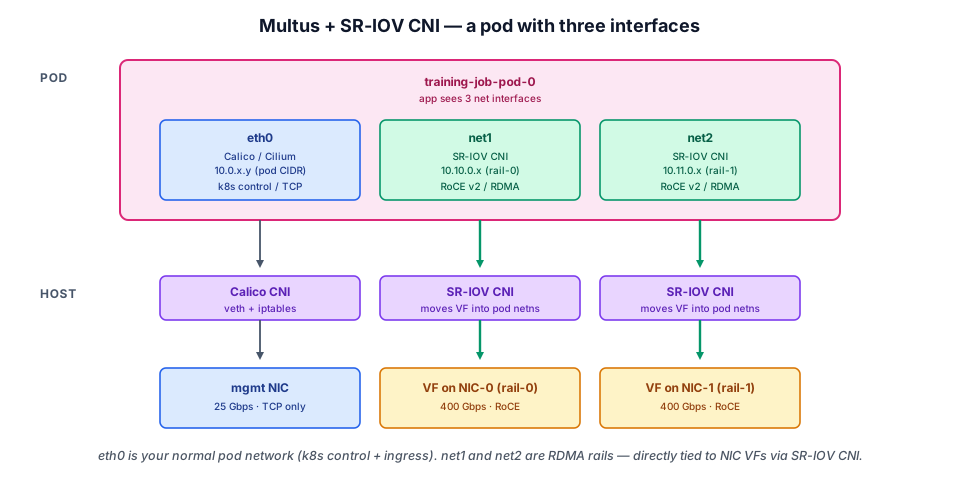
Multus CNI solves this. It's a meta-CNI plugin that:
- Becomes the primary CNI in your cluster (it's what kubelet calls)
- For the default
eth0, delegates to a regular CNI plugin (Calico, etc.) - For additional interfaces (
net1,net2, ...), delegates to a different CNI plugin (SR-IOV CNI for RDMA NICs)
The pod ends up with 9 interfaces — 1 from Calico, 8 from SR-IOV CNI. Each managed by a different plugin, all coordinated by Multus.
The pod spec declares this via an annotation:
metadata:
  annotations:
    k8s.v1.cni.cncf.io/networks: |
      [
        {"name": "sriov-rail-0", "interface": "net1"},
        {"name": "sriov-rail-1", "interface": "net2"},
        ... (six more)
      ]
Each named network is a NetworkAttachmentDefinition (NAD) — a k8s custom resource describing how to wire up that interface (which CNI plugin, what IPAM, what device pool).
This pattern — Multus + SR-IOV CNI + NADs — is universal in AI clusters. Every production deployment uses it.
See a real RDMA pod from CLI
What kubectl describe pod shows for a training pod with 8 GPUs and 8 RDMA rails:
Look for the k8s.v1.cni.cncf.io/networks annotation, the nvidia.com/gpu: 8 resource limit, the rdma/rail-N: 1 resources, and the ip -br link output showing 9 interfaces inside the pod.
Routing across rails — the multi-network reality
With 8 RDMA rails, each pod has 8 IPs on 8 different subnets:
eth0   10.244.1.42/24  (k8s management)
net1   10.50.0.10/16  (Rail 0)
net2   10.51.0.10/16  (Rail 1)
net3   10.52.0.10/16  (Rail 2)
...
net8   10.57.0.10/16  (Rail 7)
The k8s default routing table doesn't know about the rail subnets. The SR-IOV CNI adds per-interface routing rules so that traffic destined for 10.50.0.0/16 goes out net1, 10.51.0.0/16 out net2, etc.
This is where ip rule show from the Linux for Network Engineers section comes in handy — when traffic isn't going where you expect, that's the first place to look.
DNS — how pods find each other
K8s runs a cluster-internal DNS service (CoreDNS). Every pod gets:
- A hostname based on its pod name
- A DNS entry per service in
<service>.<namespace>.svc.cluster.local
For AI training:
- Workers find the leader via the service DNS name
- Direct pod-to-pod RDMA uses raw IPs (which the workers exchange via the bootstrap channel)
You probably won't directly touch DNS, but if nslookup from inside a pod fails, CoreDNS is broken — and bootstrap can't work.
Diagnose pod networking
When a pod's networking is wrong, the debug path:
# Find the pod and node
kubectl get pod -o wide

# Get into the pod
kubectl exec -it <pod> -- bash

# Inside:
ip -br addr show              # all interfaces and their IPs
ip route show                 # routing table
ip rule show                  # per-interface rules (for multi-NIC)
ip neigh show                 # ARP table
nslookup kubernetes.default   # DNS working?
nc -zv <peer-ip> 29500        # TCP reachability
ibv_devices                   # RDMA devices visible?
If ip -br addr show doesn't show net1..net8, Multus didn't attach them — check the pod annotations and NAD resources.
💡 What you should remember
| # | Concept | Why it matters | |
|---|---|---|---|
| 1 | 🌐 | Four k8s networking rules: | pod has its own IP, all pods can reach all pods, all pods can reach all services, pods can self-reach. |
| 2 | 🧩 | CNI is what implements those rules | Calico, Cilium, Flannel, others. |
| 3 | 🔁 | Services are virtual IPs | that load-balance to pod sets. Used for bootstrap in AI workloads. |
| 4 | 🛡️ | NetworkPolicy is the k8s firewall. | Default is no firewall. |
| 5 | 🔌 | K8s default = one NIC per pod. | Multus is what gets you 9. |
| 6 | 🏷️ | NAD (NetworkAttachmentDefinition) | is the k8s resource describing each additional network. One per rail. |
| 7 | 🛠️ | kubectl exec + Linux network commands | is your debug toolkit. |
Next: Operators and Helm → — the Operators that bootstrap the GPU + RDMA driver stack on every node, and the Helm charts that install them.