SR-IOV Mechanics
You met SR-IOV in Building a Training Cluster as the mechanism that lets one NIC be shared across multiple pods. This page goes deeper — what the hardware actually does, the IOMMU's role, and the long list of things that have to align for it to work.
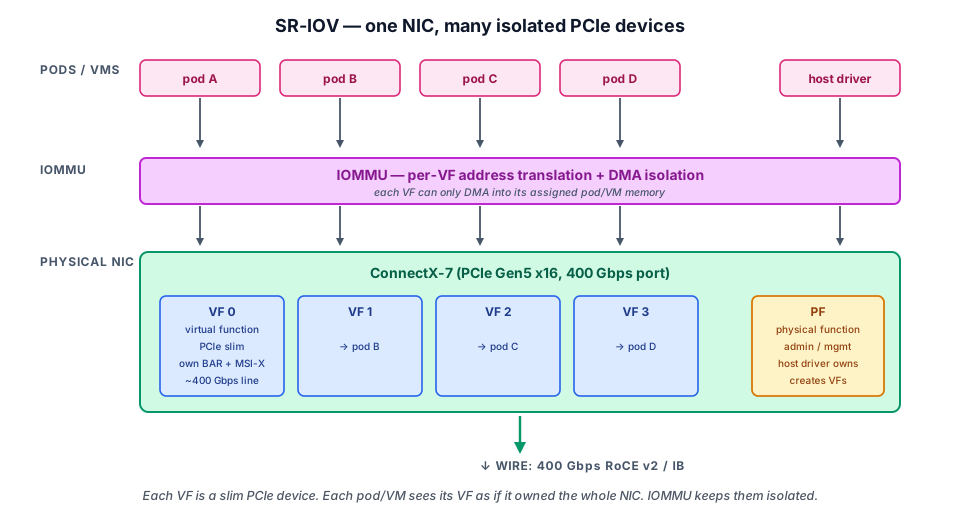
- Explain the PF/VF split — one Physical Function per port owns NIC-level config; each Virtual Function is a slim PCIe device (BDF
81:00.1...) with its own MAC, queue pairs, and Function-Level Reset. - Justify why IOMMU + ACS are mandatory — VT-d/AMD-Vi page-tables DMA, and without ACS all VFs land in one IOMMU group and can't be safely isolated.
- Walk the configuration chain — BIOS → kernel cmdline (
intel_iommu=on iommu=pt) → 1G hugepages →sriov_numvfs→modprobe mlx5_ib→ operator/CNI, and know which symptom each broken link produces. - Verify and size VFs — confirm with
lspci,rdma link,ibv_devinfo, and picknum_vfs(8 per port for training, 32–64 for inference).
The PCIe view
SR-IOV (Single Root I/O Virtualization, PCIe spec) is a hardware mechanism in the NIC ASIC that exposes itself as multiple PCIe functions to the host:
- One PF (Physical Function) per port — the "main" function. Has full configuration access to the NIC.
- N VFs (Virtual Functions) — typically 16–256 per port. Each VF appears to the OS as an independent PCIe device with its own MAC, its own queue resources, and its own DMA channel.
PCIe Root Complex
  │
  ├── Bus 81:00.0  PF eth0   (host owns)
  ├── Bus 81:00.1  VF 0      (pod A)
  ├── Bus 81:00.2  VF 1      (pod B)
  ├── Bus 81:00.3  VF 2      (pod C)
  └── ... up to N VFs
Each VF has:
- Hardware-isolated queue pairs — VFs cannot read each other's data path.
- A separate Function-Level Reset — restarting a VF doesn't affect the PF or other VFs.
- Independent MAC and IP — looks like a separate NIC on the network.
The PF retains:
- All NIC-level configuration (link speed, MTU, QoS)
- VF allocation and lifecycle (create, destroy, set MAC, set spoof-check)
- Telemetry and monitoring of the whole NIC
IOMMU — what makes it safe
Without an IOMMU, any device with DMA can write anywhere in RAM — including pages owned by the kernel or other VMs. That's how rogue device drivers compromised kernels in the 2000s.
IOMMU (I/O Memory Management Unit, Intel VT-d / AMD-Vi) sits between the PCIe bus and RAM. It maps device DMA addresses through page tables, isolating each device to only the memory it's been granted.
For SR-IOV:
- Each VF gets its own IOMMU group (with ACS — Access Control Services — enabled, VFs are isolated from each other).
- The kernel sets up IOMMU mappings before exposing a VF to a guest / container.
- DMA from a VF can only target memory pages the IOMMU has mapped for it.
If ACS is off in the PCIe switch (or the BIOS), VFs are in the same IOMMU group as the PF. That means you can't safely pass them to different VMs — the IOMMU can't separate them. Always check ACS support before deploying SR-IOV in production.
The configuration chain
To go from "I have a NIC" to "I have working VFs that pods can use," every link must be correct:
1. BIOS / firmware
- VT-d / AMD-Vi: Enabled — IOMMU on at the chipset level.
- SR-IOV: Enabled — sometimes a separate toggle.
- PCIe ACS: Enabled — required for safe per-VF isolation.
- PCIe AER (Advanced Error Reporting): Enabled — for fault containment.
Wrong here → no VFs at all, or VFs that can't be isolated.
2. Kernel command line
intel_iommu=on iommu=pt
intel_iommu=onenables the IOMMU driver.iommu=ptuses passthrough mode for host devices (PF stays direct, VFs use mapping).
On AMD: amd_iommu=on iommu=pt.
3. Hugepages
DMA at 400G needs large contiguous memory regions. Configure 2 MB or 1 GB hugepages:
default_hugepagesz=1G hugepagesz=1G hugepages=64
64 × 1 GB = 64 GB of hugepages reserved for DMA-able buffers.
4. NIC driver
Load the NIC driver with num_vfs parameter:
echo 32 > /sys/class/net/ens1f0np0/device/sriov_numvfs
This creates 32 VFs on port 0 of the NIC. The driver allocates queue resources and registers each VF with the kernel.
Verify:
lspci | grep -i mellanox    # or "Intel E810", "Broadcom Thor", etc.
# Should show 1 PF + 32 VFs
5. RDMA core
modprobe rdma_cm ib_uverbs mlx5_ib mlx5_core
# verify with:
rdma link    # should list mlx5_0 ... mlx5_N (one per VF + 1 for PF)
ibv_devinfo  # should list the same
6. k8s operator + CNI
The SR-IOV Network Operator scans the host, finds the VFs, and registers them as schedulable resources (rdma/...). The SR-IOV CNI plugin moves a VF into a pod's netns when the pod is scheduled.
Where it usually breaks
In rough order of frequency, the bugs you'll hit:
| Symptom | Cause | Fix |
|---|---|---|
sriov_numvfs write fails: "no space left" | NIC firmware has max-VF limit set lower | Update firmware, raise limit with mlxconfig |
| VFs exist but aren't isolated (all in IOMMU group 0) | ACS off in BIOS, or PCIe switch doesn't support ACS | Enable ACS in BIOS; consider PCIe topology |
Pod sees the VF but ibv_devinfo fails | RDMA driver not loaded for the VF | modprobe mlx5_ib; check operator config |
| Pod's RDMA traffic doesn't leave the host | VF's vlan / trust / spoofcheck misconfigured | Set with ip link set ... vf N ... |
| Performance is half what it should be | Hugepages not configured | Set default_hugepagesz=1G ... in cmdline |
| Random "kernel panic" during VF reset | Kernel too old for the NIC driver | Upgrade to a kernel the driver supports |
Why num_vfs = ?
You can usually create up to 16–256 VFs per port. Choosing the right number is a balance:
- Too few: can't run enough pods on one node. NIC underutilized.
- Too many: each VF gets a smaller slice of queue resources. Performance degrades per-VF.
Typical AI training cluster: 8 VFs per NIC port (one per training pod that will run on the node). For inference clusters, more VFs (32–64) can make sense to share the NIC across many small inference pods.
See it — bring up VFs manually
What the Operator does for you, walked through one step at a time: kernel cmdline check, sriov_numvfs, lspci confirmation, rdma link show verifying the VFs are RDMA-capable.
💡 What you should remember
| # | Concept | Why it matters | |
|---|---|---|---|
| 1 | 🔌 | PF is the physical function | (host driver loads here). VF is a hardware-isolated slice (pod gets one). |
| 2 | 🚫 | IOMMU + ACS is required for safe isolation | without ACS, VFs aren't truly separated. |
| 3 | 🧩 | The configuration chain is BIOS → kernel cmdline → hugepages → driver → RDMA core → operator → CNI | Any wrong link breaks the whole. |
| 4 | 🛠️ | Verify with lspci, rdma link, and ibv_devinfo | these tell you whether each layer is alive. |
| 5 | ⚠️ | Common debug pattern: | "VFs exist but RDMA doesn't work" → check mlx5_ib driver, IOMMU groups, and operator logs. |
Next: Multus and Multi-NIC Pods → — how Kubernetes attaches multiple network interfaces to a single pod, and the YAML you'll actually write.