NCCL and GPUDirect Configuration
You've configured the NICs, the QoS, the SR-IOV, the Multus attachments. The pod is running. The training script imports PyTorch and calls torch.distributed.all_reduce. Whether that AllReduce runs at 350 Gbps or 50 Gbps comes down to two things:
- NCCL picking the right NICs — and especially, the right NIC for each GPU.
- GPUDirect RDMA being active — so the NIC writes directly to GPU memory without bouncing through CPU DRAM.
This page is the host-side mile that gets the application to actually see the fabric you built.
- Set GPU-to-NIC affinity — map each GPU to the NIC on its NUMA node via
NCCL_IB_HCA,NCCL_TOPO_FILE, andnvidia-smi topo -m, and explain why a cross-NUMA pairing costs latency. - Enable and verify GPUDirect RDMA — load
nvidia_peermem, confirm withlsmod, and know that without it the GPU HBM → CPU DRAM bounce halves your bandwidth. - Set the env vars that matter —
NCCL_IB_GID_INDEX=3,NCCL_IB_TC/NCCL_IB_SL,NCCL_IB_QPS_PER_CONNECTION, andNCCL_SOCKET_IFNAMEfor bootstrap only (never the RDMA NIC). - Validate end to end — run
all_reduce_perfagainst the expected algbw curve (~300+ GB/s at 1 GB), cross-check withib_write_bw, and readNCCL_DEBUG=INFOfor theNET/IBandGDRDMAlines.
What NCCL is
NCCL (NVIDIA Collective Communications Library) is the GPU-collective library that PyTorch, JAX, and most training frameworks use under the hood. When you call all_reduce(), NCCL is what plans the algorithm (ring vs tree), picks the NICs to use, and posts the RDMA WRITEs.
For an 8-GPU server in a rail-optimized cluster, NCCL needs to know:
- Which NICs are available (8 of them)
- Which NIC belongs to which rail
- Which NIC is closest (PCIe-wise) to which GPU
- How to map "I want to talk to peer rank N" to "I should use NIC M to talk to peer N's NIC M"
Without telling it, NCCL guesses — often wrongly.
GPU-to-NIC affinity
In an 8-GPU server, each GPU sits on a specific PCIe root complex / NUMA node. Each NIC also sits on one. Same root complex = direct PCIe path. Different root complex = data hops across the CPU's PCIe switches, adding latency.
In a DGX-style server:
NUMA node 0:    GPU 0   GPU 1   GPU 2   GPU 3   NIC 0   NIC 1   NIC 2   NIC 3
NUMA node 1:    GPU 4   GPU 5   GPU 6   GPU 7   NIC 4   NIC 5   NIC 6   NIC 7
GPU 0 should use NIC 0 (same root complex, lowest-latency PCIe path). GPU 4 should use NIC 4. Cross-NUMA pairings (e.g., GPU 0 ↔ NIC 5) hop through QPI / Infinity Fabric and cost latency.
You tell NCCL this affinity via:
export NCCL_IB_GID_INDEX=3              # which GID (IP address) to use on the VF
export NCCL_IB_HCA=mlx5_0,mlx5_1,...    # explicit list of NICs to use
export NCCL_TOPO_FILE=/etc/nccl/topo.xml  # custom topology file
The NCCL_TOPO_FILE is a vendor-provided XML that tells NCCL exactly which NIC pairs with which GPU. NVIDIA publishes these for DGX boxes; for custom HGX / MGX systems you derive it from nvidia-smi topo -m output.
GPUDirect RDMA — the zero-copy path
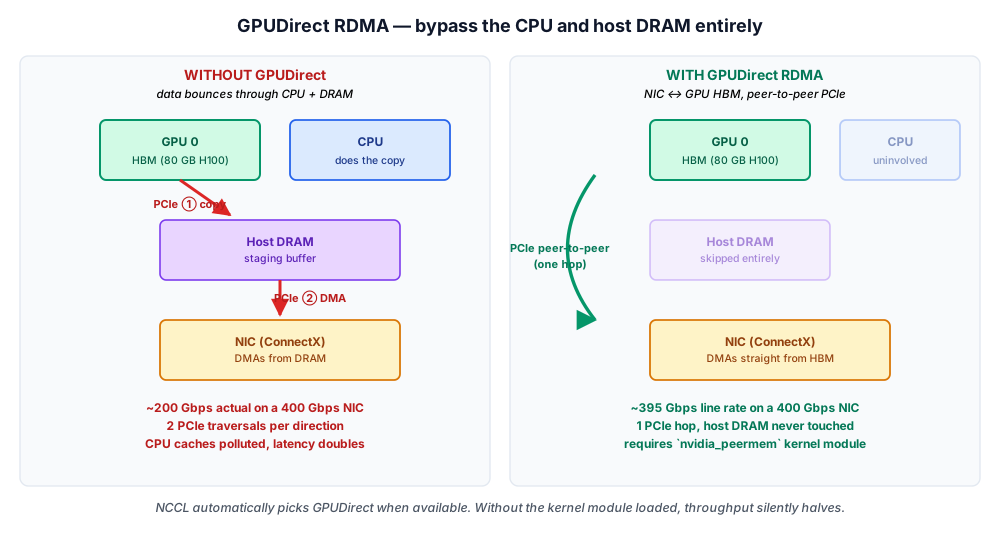
Without GPUDirect, when a NIC sends data from GPU memory, the path is:
GPU HBM → PCIe → CPU DRAM (bounce buffer) → PCIe → NIC → wire
The CPU DRAM bounce doubles the PCIe traffic and adds 5–10 μs of latency per message. At 400 Gbps, this is a serious bottleneck.
With GPUDirect RDMA enabled, the NIC and GPU talk over PCIe directly:
GPU HBM → PCIe → NIC → wire
No CPU DRAM bounce. No CPU involvement. The data goes straight from one accelerator to another.
For GPUDirect to work, you need:
- NVIDIA driver with GPUDirect support (default in recent drivers).
- NIC and GPU on the same PCIe root complex (or at least within a switch that supports peer-to-peer DMA).
nvidia_peermemkernel module loaded — bridges the NVIDIA driver to the RDMA core.- NCCL configured to use it — usually automatic if everything else is in place.
Verify:
lsmod | grep nvidia_peermem      # should appear
modinfo nvidia_peermem           # check the module exists
Without GPUDirect, you'll see roughly half the bandwidth NCCL should achieve. It's a 2× difference, immediately observable in nccl-tests results.
The RDMA-core data path is the same on every stack; what changes is the kernel module that lets the NIC DMA straight into accelerator memory:
| Vendor | Peer-to-peer bridge | Verify |
|---|---|---|
| NVIDIA | nvidia_peermem kernel module | lsmod | grep nvidia_peermem |
| AMD (ROCm) | ROCm peer-to-peer — amd_peer_mem, or kernel DMABUF on Linux 5.12+ | lsmod | grep amd_peer_mem (DMABUF path needs no extra module) |
Modern rdma-core supports the DMABUF path, so on recent kernels AMD GPUDirect-equivalent transfers work without a vendor module at all.
NVIDIA stays the worked example on this page; the AMD equivalences sit alongside.
The variables that matter
The NCCL_* environment variables are how you tell NCCL what to do. The shortlist for rail-optimized RoCE v2:
| Variable | Typical value | What it does |
|---|---|---|
NCCL_DEBUG | INFO (debug) / WARN (prod) | Verbosity |
NCCL_IB_HCA | mlx5_0,mlx5_1,...,mlx5_7 | NICs to use |
NCCL_IB_GID_INDEX | 3 (for RoCE v2 RDMA-CM) | Which GID (IP) per NIC |
NCCL_IB_TIMEOUT | 22 (default) | RDMA timeout in 2^n seconds |
NCCL_IB_RETRY_CNT | 7 | RDMA retry count |
NCCL_IB_QPS_PER_CONNECTION | 4 | Parallel QPs per peer (for hash entropy) |
NCCL_SOCKET_IFNAME | eth0 | Interface for bootstrap (NOT data) |
NCCL_IB_SL | 3 | Service level / priority for RDMA traffic |
NCCL_TOPO_FILE | /etc/nccl/topo.xml | Topology file path |
NCCL_NET_GDR_LEVEL | 5 (PHB) | GPUDirect aggression level |
NCCL_P2P_LEVEL | NVL | NVLink-only for intra-node GPU↔GPU |
Most NVIDIA reference container images set sensible defaults. For a custom setup, copy from NVIDIA's nccl-tests README and tune from there.
This whole table applies to RCCL unchanged. AMD's library reuses every NCCL_* name verbatim, so the same NCCL_IB_HCA / NCCL_IB_GID_INDEX / NCCL_NET_GDR_LEVEL block configures an MI300 host with no edits.
Intel's oneCCL is the exception — it uses the CCL_* namespace (CCL_LOG_LEVEL, CCL_WORKER_COUNT), so the variable names differ even though the RoCE concepts are identical.
The benchmark you run to validate also has a per-vendor name — same test, same algbw curve to compare against:
| Vendor | Collective benchmark |
|---|---|
| NVIDIA | nccl-tests (all_reduce_perf) |
| AMD | rccl-tests (all_reduce_perf) |
| Intel | oneCCL benchmark (benchmark) |
How to verify it's working
Watch the four-step verification chain on the rockynet lab simulator — confirm nvidia_peermem is loaded, check nvidia-smi topo -m for PIX paths between each GPU and its NIC, source the NCCL env, then run all_reduce_perf and see GDRDMA show up in the NCCL log:
Three checks:
1. nccl-tests/all_reduce_perf
NVIDIA's reference benchmark. Expected throughput on an 8-GPU 8-NIC RoCE v2 node:
| Message size | Expected algbw |
|---|---|
| 1 MB | ~50 GB/s (limited by latency) |
| 64 MB | ~200 GB/s |
| 1 GB | ~300+ GB/s (close to NIC line rate × 8) |
If you're seeing half these numbers, GPUDirect probably isn't active.
2. ib_write_bw between two pods
Pod A:
ib_write_bw -d mlx5_0 --use_cuda=0 -s 65536 -n 10000
Pod B (connect to A):
ib_write_bw -d mlx5_0 --use_cuda=0 -s 65536 -n 10000 <pod-a-ip>
Should hit ~95% of line rate on a single rail. If not, NIC config or QoS is off.
3. NCCL debug output
export NCCL_DEBUG=INFO
Look for:
NET/IB: Using ...lines (should list 8 HCAs)NET/Plugin: Using internal P2P plugin(good — using RDMA)using NCCL_P2P_LEVEL=NVL(good — intra-node uses NVLink)- No
WARNorWARN: skipping ...messages
What can go wrong
The classic failures and their causes:
| Symptom | Cause |
|---|---|
| AllReduce uses only 1 NIC | NCCL_IB_HCA not set; NCCL discovered 1 NIC |
| AllReduce throughput is half expected | GPUDirect inactive — check nvidia_peermem module |
| Some pairs are slow, others fast | NUMA topology mismatch; check topo.xml |
| Random hangs after many iterations | NCCL_IB_TIMEOUT too short for the actual network RTT |
| "NCCL ... unhandled cuda error" | GPU driver / CUDA / NCCL version mismatch |
| Bootstrap fails | NCCL_SOCKET_IFNAME pointing at the wrong (RDMA) interface |
💡 What you should remember
| # | Concept | Why it matters | |
|---|---|---|---|
| 1 | 🧠 | NCCL is what your training framework actually uses for collectives. | Configure it right or training is slow. |
| 2 | 🔌 | GPU-to-NIC affinity matters | each GPU should pair with the NIC on its NUMA node. Get this wrong, lose latency. |
| 3 | ⚡ | GPUDirect RDMA is mandatory at 400 G+ | without it, throughput halves. Verify nvidia_peermem is loaded. |
| 4 | 🔑 | NCCL_IB_HCA | is the most important env var — tells NCCL which NICs to use. |
| 5 | 🌐 | NCCL_SOCKET_IFNAME is for bootstrap only | don't accidentally point it at the RDMA interface. |
| 6 | 📊 | Always verify with nccl-tests before training. | Catch performance issues early. |
Next: Host-Side Lossless → — the mlnx_qos / sysfs commands that actually make a rail lossless on the host, plus the RDMA counter reference card for proving PFC and ECN are working.