Inside GPU Anatomy — Hardware
You know why GPUs replaced CPUs (the previous page). Now: open the box.
Two pages. This one is the hardware view — vendors, the dual-tray architecture, every component in the chassis, and how the rack/pod wraps around it. The next page is the same machine viewed from the shell — every command you'd run to verify, triage, or pre-flight a host.
- Name the GPU vendors and their flagships — NVIDIA, AMD, Intel, Google — and know who's actually shipping in production.
- Walk every component of a DGX H100 — GPU, HBM, NVSwitch, ConnectX-7, PCIe, CPUs, cooling — and map the AMD MI300X equivalent for each one.
- Articulate the "scale-up vs scale-out" split — NVLink (or AMD Infinity Fabric/xGMI) at TB/s inside the box, RoCE at 400 Gbps outside the box — and where the boundary lands.
- Recite the 1 NIC per GPU rule — rail-optimized topology lives or dies by this.
Hardware terms (NVLink, NVSwitch, SXM5, HGX, PCIe Gen5, rail-optimized) are introduced inline below. The full glossary lives one page back — From CPU to GPU.
1. The GPU landscape — who makes them
The vendor map in 2026:
The default everyone copies
- H100
- H200
- B100 · B200
- GB200
- B300
The reference. Any DGX-class server you'll see in production is NVIDIA. NVLink + ConnectX + Spectrum-X is the all-NVIDIA stack.
The CIO's hedge
- MI300X
- MI325X
- MI350
- MI400
Microsoft, Meta, and Oracle have all bought MI300X. Backs UALink as the open alternative to NVLink.
Niche in Intel-stack shops
- Gaudi 3
Habana-acquired silicon. Niche in customers committed to Intel CPUs + accelerators. Limited training-cluster footprint.
The vertical that doesn't sell silicon
- TPU v5p
- Trillium
You don't put these in a server you own. ICI is the TPU equivalent of NVLink. Internal Google + GCP customers only.
What this means for a network engineer:
- Any DGX-class server you'll see in production is NVIDIA H100/H200/B100/B200. AMD MI300X clusters exist but are rarer.
- The NIC and switch story tracks the same way — NVIDIA ConnectX + Spectrum for the all-NVIDIA stack, Broadcom Thor + Tomahawk or Arista 7060X / 7800 for everything else.
- Don't assume "NVIDIA GPU = NVIDIA fabric." Most production deployments are NVIDIA GPUs + NVIDIA NICs + open switching (Arista or Tomahawk). The pure Spectrum-X stack is newer and growing share but isn't dominant yet.
2. Inside one GPU server — the DGX H100 reference
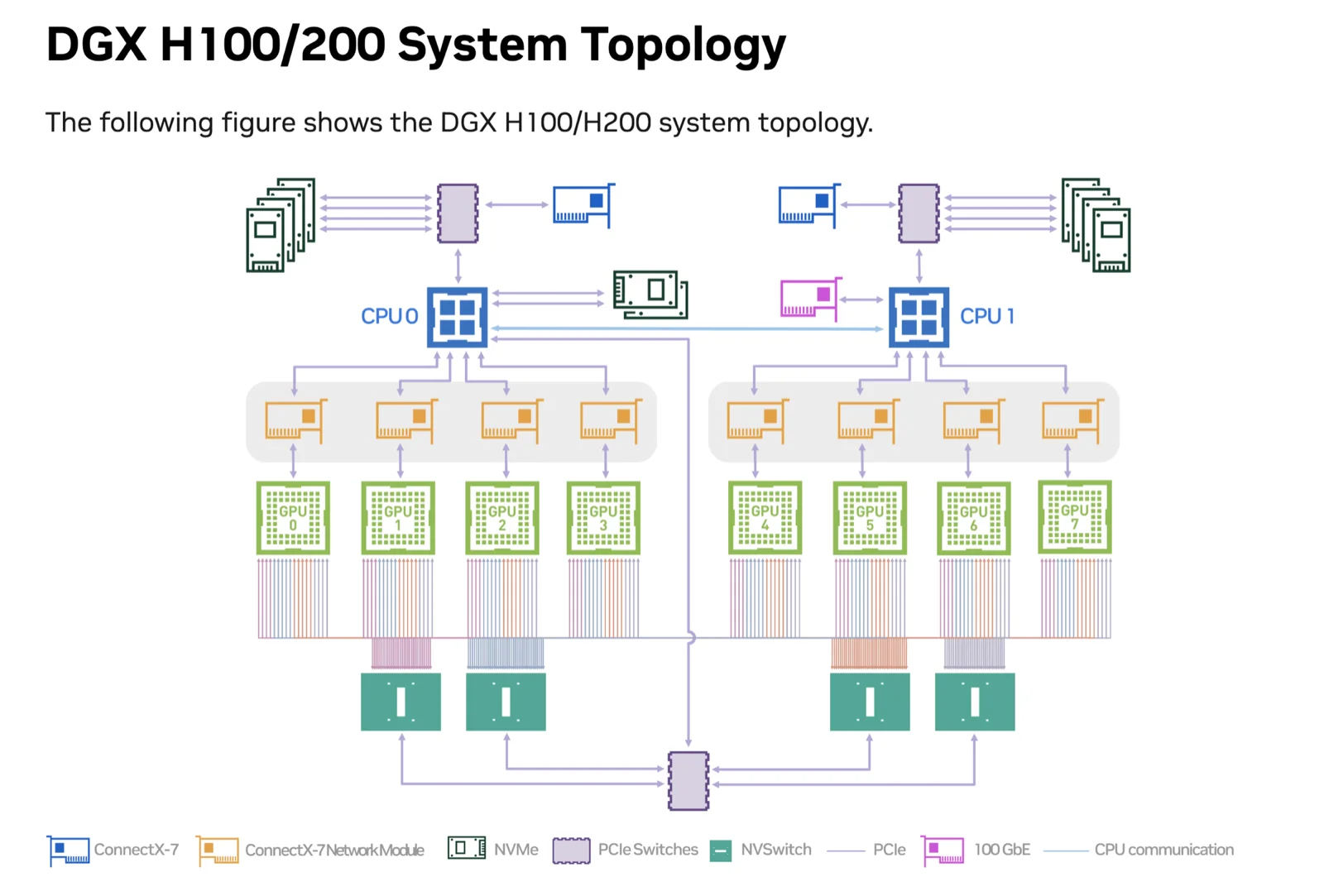
The DGX H100 is the reference design. 8× H100 GPUs, 4× NVSwitch chips, 8× ConnectX-7 NICs, 2× Intel Xeon CPUs, 2 TB DDR5, eight 400G ports out the back. Most non-NVIDIA reference designs (OCP MGX, Microsoft Maia hosts, Meta Grand Teton) follow the same shape: 4 or 8 GPUs, 1 NIC per GPU, dual CPUs.
The official NVIDIA topology
NVIDIA's own diagram of the exact wiring. Two CPUs at the top, eight GPUs in the middle paired 1:1 with eight ConnectX-7 NICs, and four NVSwitch chips at the bottom forming the all-to-all NVLink mesh between every GPU:
Component by component — the cluster builder's reference
Everything that goes into one DGX-class node. Use this table when you're sizing power, ordering parts, or sanity-checking what a vendor handed you.
| # | Component | Spec | Role · what to watch | |
|---|---|---|---|---|
| 1 | 🎮 | 8× H100 SXM5 GPU | 132 SMs × 128 CUDA cores · 700 W cap · SXM5 module on the HGX baseboard | The compute. All 8 must enumerate. ECC=0 at boot. Pinned at P0 during training (no power-state oscillation). |
| 2 | 🔥 | HBM3 — 8× 80 GB | ~3.35 TB/s per GPU (aggregate) · 640 GB total · soldered to the die | Where the model and activations live. Per-GPU memory must read 81 559 MiB free before NCCL starts. |
| 3 | 🌀 | 4× NVSwitch (4th-gen) | Non-blocking crossbar · sits between the two GPU rows | The scale-up fabric. nvidia-smi topo -m must show NV18 between every GPU pair — that's the proof the mesh is whole. Internal only; never touches your Ethernet fabric. |
| 4 | 🔗 | NVLink 4.0 | 18 links per GPU · 50 GB/s bidirectional per link · 900 GB/s bidirectional per GPU | The wires inside the GPU tray. Bypasses CPU entirely. The reason a GPU can read another GPU's HBM at memory-bus speeds. |
| 5 | 📡 | 8× ConnectX-7 RDMA NIC (back-end fabric) | 400 Gbps · RoCE v2 by default · 1 NIC per GPU (rail-optimized) | The back-end / scale-out fabric — the AllReduce path. 8 × 400 = 3.2 Tbps host fan-out. Each NIC sits on the same PCIe root as its paired GPU so GPUDirect can DMA straight into HBM. Lands on a dedicated Compute ToR — never shared with front-end. |
| 6 | 🔌 | 4× OSFP cage (rear panel) | Each OSFP carries 2× 400 G ConnectX-7 lanes | The physical ports out the back of the chassis. 4 cages × 2 = 8 NICs. Any port not at 400 G = bad transceiver, dirty fibre, or switch-side speed mismatch — investigate. |
| 7 | 🧠 | 2× Intel Xeon Platinum 8480C | 56 cores each (112 total) · DDR5 + PCIe Gen5 host controller | Boot, scheduling, ingest, dataset preprocessing — NOT in the AllReduce data path. One CPU per NUMA half; Linux pins each GPU+NIC pair to its socket. |
| 8 | 💾 | 32× DDR5 DIMM — 2 TB total | 16 DIMMs per socket · DDR5-4800 typical | OS, framework runtime, data loader, checkpoint stage area. The model does not live here — that's HBM's job. |
| 9 | 🚌 | PCIe Gen5 switches & lanes | ×16 = 128 GB/s per link · 8 PCIe root complexes (one per GPU+NIC pair) | The CPU↔GPU + GPU↔NIC control substrate. lspci -tv must show GPU + paired NIC on the same root. If not, GPUDirect can't shortcut the CPU and AllReduce throughput collapses. |
| 10 | 💿 | 2× M.2 NVMe — OS / boot | 1.92 TB each · RAID 1 · NVMe | OS, kernel, drivers, container runtime. Failure path = host evicted from the training pool. Check mdadm health on every boot. |
| 11 | 📀 | 8× U.2 NVMe — data cache | 3.84 TB each · RAID 0 · ~30 TB total | Active dataset cache. RAID 0 = any drive loss wipes the whole cache. The read bandwidth feeds the training data loader at GPU pace. |
| 12 | 🌐 | Storage NIC (front-end fabric) | 100–200 Gbps · ConnectX silicon at a lower speed grade · 1–2 ports | The front-end fabric for storage I/O. Reads training data, writes checkpoints. Kept off the RoCE back-end so storage bursts can't mix with AllReduce. Lands on a separate front-end ToR / storage VRF. |
| 13 | 🛜 | 2× dual-port management Ethernet (front-end) | 10–25 Gbps · in-band | The front-end fabric for orchestration: Kubernetes / Slurm, monitoring scrape, log shipping. Not in the RoCE data path. Same front-end ToR as the storage NIC, often a different VLAN. |
| 14 | 🪪 | BMC — 1× GbE RJ45 (OOB) | Always-on · Redfish / IPMI · power & sensor control | The out-of-band lifeline. How you reboot a wedged host with nobody on-site. One per chassis — do not lose it on the cabling diagram. Dedicated OOB VLAN, never bridged into the data fabrics. |
| 15 | ⚡ | 6× 3.3 kW PSU | 19.8 kW total · 4+2 redundant · pulls from 2 separate PDUs | Power. Will not POST below 3 PSUs alive — a common first-boot surprise. Plan PDU capacity for sustained load + headroom. |
| 16 | 🌡️ | Cooling | 10.2 kW typical heat load · air-cooled on DGX H100 · liquid for dense racks | First-class fabric design constraint. B200 / B300 designs are liquid-cooled by default — your rack PDU + CDU capacity caps the AI hosts per row long before the spine does. |
How to read this table: rows 1–6 are the GPU tray (the engine room). Rows 7–14 are the motherboard tray + management plane. Rows 15–16 are the chassis-level plant that determines how many of these nodes you can fit in a row.
If you're sizing a cluster, the load-bearing numbers are 3.2 Tbps host fan-out (row 5), 128 GB/s PCIe Gen5 per GPU (row 9), and 10.2 kW per node (rows 15–16). Everything else is consequence.
The AMD counterpart — an MI300X platform
The DGX H100 is the NVIDIA reference. The AMD Instinct equivalent is an 8× MI300X OAM platform — OCP Grand Teton (Meta), Supermicro AS-8125GS, or HPE Cray XD are the chassis you'll actually see. The shape is identical — 8 GPUs, 1 NIC per GPU, dual CPUs, three fabrics out the back — but the engine room swaps NVIDIA silicon for AMD. Only the engine-room rows change; the motherboard, storage, BMC, PSU, and cooling rows look the same as the DGX table above.
| # | Component (8× MI300X platform) | Spec | Role · what to watch | |
|---|---|---|---|---|
| 1 | 🎮 | 8× MI300X OAM GPU | CDNA 3 · 750 W cap · OAM module on the UBB baseboard | The compute. All 8 must enumerate. Pinned at P0 during training. rocm-smi is your nvidia-smi. |
| 2 | 🔥 | HBM3 — 8× 192 GB | ~5.3 TB/s per GPU (aggregate) · 1.5 TB total · soldered to the die | 2.4× the HBM of an H100 (192 GB vs 80 GB). The headline reason to pick MI300X — bigger models fit per GPU. MI325X pushes this to 256 GB HBM3E. |
| 3 | 🌀 | Infinity Fabric switch (on-board mesh) | All-to-all xGMI mesh across the 8 GPUs on the UBB | The scale-up fabric. Plays the role NVSwitch plays on a DGX — but it's an on-board mesh across the 8 GPUs, not an external fabric switch at H100-NVL72 scale. Internal only; never touches Ethernet. |
| 4 | 🔗 | Infinity Fabric (xGMI) | 7 xGMI links per GPU · ~896 GB/s–1.2 TB/s bidirectional per GPU | The wires inside the GPU tray. AMD's NVLink. GPU+CPU coherent, sub-μs, bypasses the CPU for GPU↔GPU reads. |
| 5 | 📡 | 8× RDMA NIC (back-end fabric) | 400 Gbps · RoCE v2 · 1 NIC per GPU (rail-optimized) · Broadcom Thor or NVIDIA ConnectX-7 | Identical back-end story to the DGX — same Ethernet fabric, same RoCE v2. AMD GPUs use ROCm P2P / amd_peer_mem instead of GPUDirect to DMA straight into HBM. 8 × 400 = 3.2 Tbps host fan-out. |
Everything from row 6 down (OSFP cages, CPUs, DDR5, PCIe Gen5, NVMe, storage/mgmt NICs, BMC, PSUs, cooling) matches the DGX table — the chassis plant doesn't care which GPU vendor is in the tray.
If you know the NVIDIA stack, you already know the AMD stack — it's the same shapes with different names. Memorize this row and 90% of "wait, what's the AMD version of X?" disappears:
| NVIDIA | AMD | What it is |
|---|---|---|
| NVLink | Infinity Fabric (xGMI) | GPU↔GPU scale-up wires |
| NVSwitch | Infinity Fabric switch (on-board mesh across 8 GPUs) | The all-to-all crossbar |
| CUDA | ROCm | The GPU programming stack |
| NCCL | RCCL | Collective library — drop-in, reuses the NCCL_* env-var names |
| GPUDirect RDMA | ROCm P2P / amd_peer_mem | NIC-writes-straight-to-HBM |
nvidia-smi | rocm-smi | The GPU CLI |
The back-end fabric (RoCE v2 over Ethernet, 1 NIC per GPU, PFC/ECN) is vendor-neutral — it's identical whether the tray holds H100s or MI300Xs.
The dual-tray block diagram
Same machine, viewed as a system block diagram. The 8U chassis splits into a GPU tray (the engine room) and a motherboard tray (the brain). The rear panel is grouped by fabric: power · back-end (the OSFP cages → 8 ConnectX-7s carrying RoCE) · front-end (storage NIC + mgmt Ethernet over TCP/IP) · out-of-band (BMC). NVLink stays inside the GPU tray; PCIe Gen5 crosses between trays; the OSFP cages hand the 8 back-end NICs out to the Compute ToR while the front-end NICs land on a separate switch entirely:
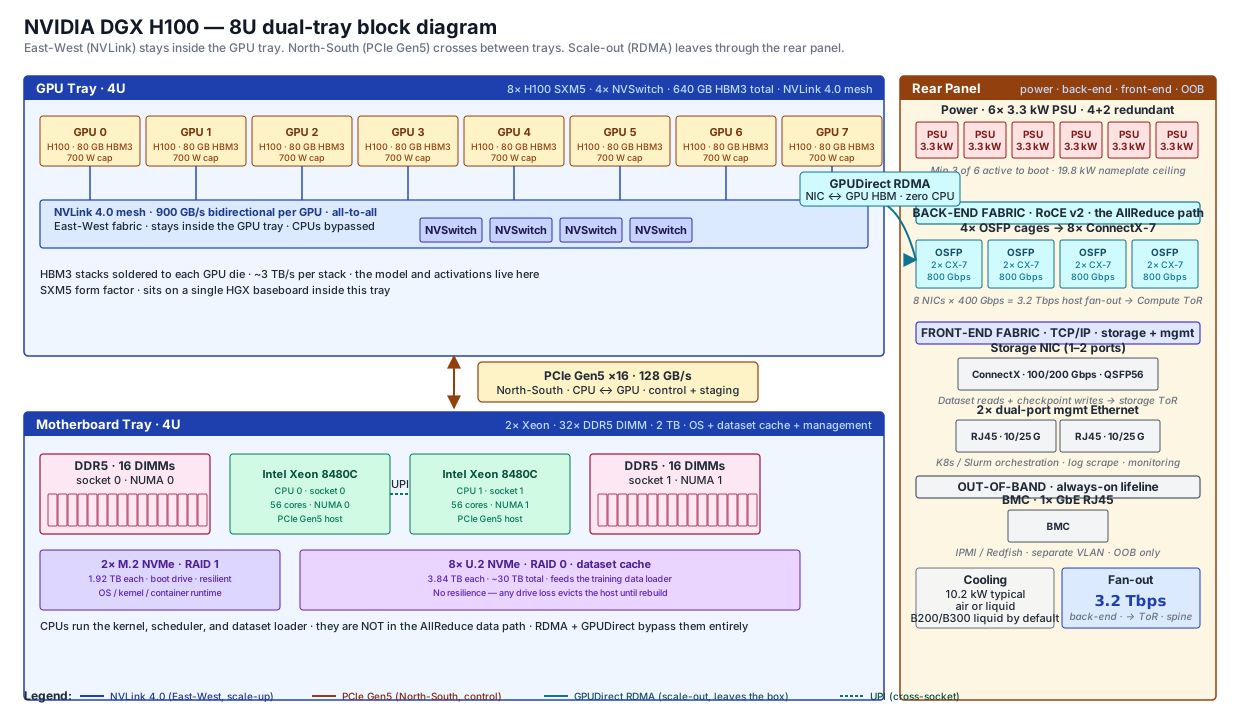
Two flows to read off this diagram:
- East-West (GPU ↔ GPU): NVLink 4.0 at 900 GB/s. Stays inside the GPU tray. CPUs never touch this traffic. This is the scale-up fabric.
- North-South (CPU ↔ GPU): PCIe Gen5 ×16 at 128 GB/s. Crosses between trays. Used for control, OS, scheduling, and dataset staging — not for the AllReduce data path.
- Outbound (GPU → cluster): GPUDirect RDMA via ConnectX-7. The NIC writes straight to GPU HBM, bypassing the CPU entirely. This is the scale-out fabric — the part of the network you're going to spend the next 50 pages on.
Want to see this same machine from the shell? Every component above prints something at the CLI. The CLI walkthrough —
nvidia-smi, NVLink mesh,lspci,ibstat,ipmitool,dcgmi, and the pre-flight checks — lives on its own page: Inside GPU Anatomy — CLI Version →.
3. Three fabrics in one server — scale-up, back-end, front-end
A DGX-class server attaches to three completely separate networks at once. Most curriculum content fixates on the back-end (the RoCE fabric carrying AllReduce), but a cluster builder owns all three. They share a chassis. They do not share switches.
| Fabric | What it carries | Where it lives | Hardware in this box |
|---|---|---|---|
| Scale-up | GPU ↔ GPU exchanges at the chip level. AllReduce data movement inside the box. | Entirely internal to the chassis | NVLink 4.0 mesh through 4× NVSwitches · 900 GB/s per GPU |
| Back-end (a.k.a. scale-out or compute fabric) | The portion of the AllReduce that crosses between hosts. RoCE v2. Microsecond latency, 0% loss tolerance. | Out the rear panel, onto a dedicated spine-leaf fabric | 8× ConnectX-7 NICs · 400 Gbps each · 1 per GPU (rail-optimized) · 3.2 Tbps host fan-out |
| Front-end (the "everything else" fabric) | Storage I/O (dataset reads, checkpoint writes), Kubernetes / Slurm orchestration, log scrape, monitoring, BMC OOB. Standard TCP/IP. | Out the rear panel, onto a separate DC switch | Storage NICs (100/200 G · ConnectX silicon, lower grade) + 2× mgmt Ethernet (10/25 G) + 1× BMC RJ45 (1 G OOB) |
The rule: the back-end and front-end fabrics never share a switch, a VLAN, or an uplink. The reason is microseconds — a storage burst or a Prometheus scrape mixed onto the RoCE fabric eats headroom that AllReduce was counting on, and tail latency blows up. Vendors enforce this with separate ToRs. The diagram makes that visible:
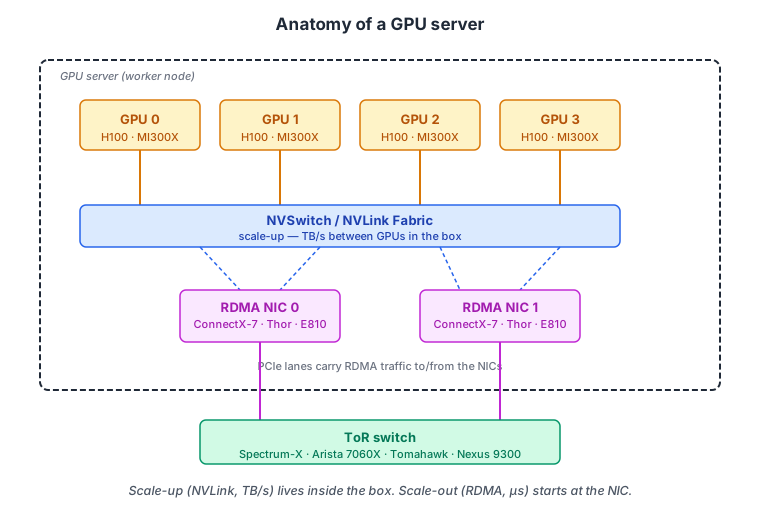
How to read the diagram:
- Scale-up (amber) — NVLink mesh band at the top. 8 GPUs talk through 4 NVSwitches at 900 GB/s each. No CPU, no Ethernet, no switch outside the chassis. This traffic literally cannot leave the box.
- Back-end (teal) — 8 ConnectX-7 NICs, one per GPU, paired via PCIe Gen5. Lines drop to a wide Compute ToR that aggregates 3.2 Tbps from this single host. This is where rail-optimized spine-leaf design starts. The RoCE v2 fabric the rest of this curriculum is about.
- Front-end (indigo) — A smaller set of NICs on the right: storage, mgmt Ethernet, BMC. Drops to a separate, smaller Front-end ToR. Standard TCP/IP. Different switches, different VRF, often different cabling color.
The most common cluster-build mistake is co-mingling the two fabrics on the same leaf switch "to save ports." It works in lab. It collapses under real load. Two physical fabrics, always.
4. Beyond the box — rack and pod
A GPU server lives in a rack. Each rack has one or more ToR switches (NVIDIA Spectrum-4, Arista 7060X/7800, Cisco Nexus 9300, Tomahawk-based whiteboxes) aggregating the NICs. Beyond the rack, ToRs connect up through spine switches in either a classic spine-leaf CLOS or a rail-optimized pattern where each GPU rail has its own dedicated leaf+spine pair (the dominant pattern for 10K+ GPU clusters).
A pod is a self-contained training fabric, typically 256–2,048 GPUs. Larger jobs stitch pods together across super-spines — a third tier. Topology + sizing is covered in depth in AI Fabric Architecture.
💡 What you should remember
| 🏭 | NVIDIA dominant, AMD second | H100 / H200 / B100 / B200 on top. MI300X is the credible second source. |
| 📦 | Two trays, one server | GPU tray (8 GPUs + NVSwitches + HBM) sits above the motherboard tray (CPUs, NICs, BMC, PSUs). Know which tray every component lives on. |
| 🌀 | NVLink stays inside; RDMA goes outside | 900 GB/s NVLink mesh (or AMD Infinity Fabric/xGMI at ~896 GB/s–1.2 TB/s) between GPUs in the box; 400 Gbps RoCE NIC per GPU to the fabric. |
| 🟥 | AMD maps 1:1 onto NVIDIA | NVLink→Infinity Fabric(xGMI), NVSwitch→on-board IF mesh, CUDA→ROCm, NCCL→RCCL, GPUDirect→ROCm P2P. MI300X carries 192 GB HBM3 (vs 80 GB). The RoCE back-end is identical either way. |
| 🧵 | Three fabrics, one server | Scale-up (NVLink, in-box) · back-end (RoCE v2 from the 8 ConnectX-7s — the AllReduce path) · front-end (storage + mgmt + BMC over TCP/IP). Back-end and front-end use separate switches — never share a VLAN. |
| 🎯 | 1 NIC per GPU is the rule | Back-end rail-optimized topology lives or dies by this — 8 GPUs = 8 ConnectX-7 NICs, each on the matching NUMA half. Front-end NICs are 1–2 separate cards, on a different ToR. |
| 🪪 | BMC is the lifeline; PSUs vote | OOB BMC lets you recover a dead node without a truck roll. 4+2 PSU redundancy — you need at least 3 of 6 PSUs alive or the node won't boot. |
| 🔌 | CPUs aren't in the data path | They boot, schedule, and stage. The AllReduce never goes through the kernel — RDMA + GPUDirect bypass them. |
| 🔥 | One DGX H100 = 10.2 kW | Per server. Liquid cooling becomes mandatory at B200 scale. Power and cooling are now first-class fabric design constraints. |
Next: Inside GPU Anatomy — CLI Version → — the same machine viewed from the shell. nvidia-smi, NVLink mesh, lspci, ibstat, ipmitool, dcgmi — every component, one command at a time.