GPU vs CPU — What Changed About Compute
You know CPUs — you've configured them, scheduled them, watched their traffic for 20 years. AI runs on GPUs, and they are nothing like CPUs. The network around them had to change because of it.
This page is the first of three on the machine that runs AI: GPU vs CPU (here), inside a GPU server, and the manufacturers you'll meet.
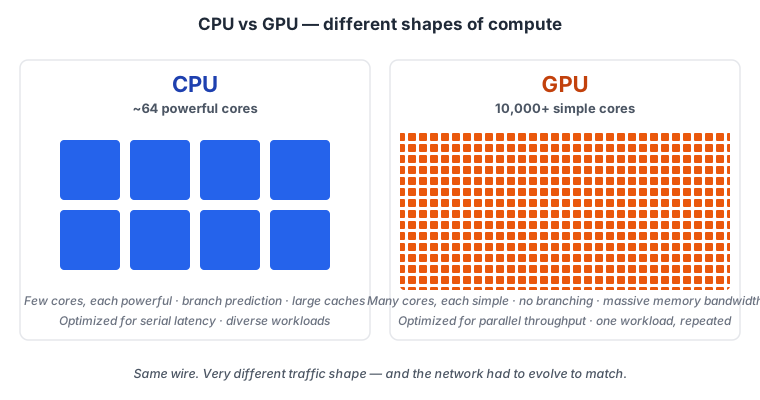
The job description (network engineer edition)
A CPU does what your services do: millions of small uncorrelated requests, each finishing as fast as possible. It's the data plane of a busy web tier.
A GPU does one thing: matrix multiplication. Repeated billions of times. In lockstep. With thousands of peer GPUs across the cluster. It's ping -f from every node to every other node — except instead of pings, it's gigabytes of gradients, sustained for seconds.
| Network concept you know | GPU equivalent |
|---|---|
| A CPU has 16–64 powerful cores | A GPU has 10,000+ simple cores (an H100 has 132 SMs × 128 lanes each) |
| RAM at ~100 GB/s (DDR5) | HBM3e at ~3 TB/s — 30× the bandwidth |
| Branch prediction, OOO execution, deep caches | None of that — just wide, fast, parallel arithmetic |
| Talks to NIC via PCIe at ~128 GB/s | Talks to NIC via PCIe at ~128 GB/s (same wire, way more through it) |
The CPU is a chef preparing one customized meal at a time. The GPU is a factory line stamping the same part, millions per minute. The difference between them is what each one does to your network.
What this does to your traffic
CPU traffic is what you've spent your career on: small flows, decorrelated, plenty of idle time on every link. TCP works fine. ECMP balances well because flows are statistically independent. 4:1 oversubscription is OK because most flows are waiting anyway — for a database, for a user, for the next request.
GPU traffic is none of those things.
Every training step, every GPU has to share its gradient (the math update from that step) with every other GPU in the cluster. This is a collective operation — AllReduce, AllGather, or ReduceScatter. It's the AI equivalent of LSA flooding: every node sends its update to every other node before the next step can start. No skipping. No buffering for later. Every step. Every few seconds.
The gradient is the same size as the model. Here's what that means in concrete terms:
| Model | Parameters | Gradient per training step |
|---|---|---|
| ResNet-50 (image classifier) | 25 M | 100 MB |
| Llama 2 7B | 7 B | 28 GB |
| Mistral Large | 123 B | 492 GB |
| GPT-3 | 175 B | 700 GB |
| Llama 3 405B | 405 B | 1.6 TB |
| GPT-4 (estimated) | 1.8 T | 7.2 TB |
For GPT-3, that's 700 GB synchronized across every GPU, every training step, every few seconds, for weeks straight.
That's not your data plane on a busy Tuesday. That's your data plane on its worst day, repeated continuously, for a month.
That's your network traffic. That's what you're building for.
Why one slow link kills the whole job
Here's the load-bearing fact for a network engineer:
A collective step finishes when every GPU finishes.
If 8,191 GPUs finish their AllReduce in 50 ms and one GPU takes 70 ms because its uplink is congested, every GPU sits idle for 20 ms. Per step. With training jobs running for weeks at thousands of dollars per GPU-hour, those 20 ms become a multi-million-dollar tax.
Your job as the network engineer is to make sure that doesn't happen. Specifically: make sure the slowest link is not measurably slower than the median link. Tail latency dominates AI fabric design. The p99.99 packet is the one you have to engineer for.
This is the inversion that broke 30 years of fabric design intuition: you used to optimize for average throughput. Now you optimize for worst-case latency.
What you already know vs what's new
The translation table you'll come back to:
| You know | What's new |
|---|---|
| ECMP balances flows statistically | Synchronized collectives = hash polarization on elephant flows |
| TCP retransmits handle occasional loss | 0.1% loss = 10× throughput hit for RDMA. Loss is catastrophic, not "fine." |
| Average latency on the path matters | Tail latency dominates — one slow link stalls thousands of GPUs |
| 4:1 oversubscription is normal in DC fabrics | AI fabrics are 1:1. No oversubscription anywhere. |
| Buffers absorb bursts | Buffers fill in microseconds under collective bursts. PFC has to fire. |
Everything you know about CLOS still works as a starting point. The differences in the right column are exactly what the rest of this curriculum teaches.
What you should remember
- GPUs are not CPUs. Many simple cores, no branching, optimized for parallel matrix math.
- Gradients are your traffic. Same size as the model — hundreds of GB per step for large models.
- AllReduce = LSA flooding. Every GPU has to share with every other GPU before the next step.
- Tail latency is the only latency that matters. One slow link stalls thousands of GPUs.
- 0.1% loss = 10× throughput hit. Loss is catastrophic, not "fine." This is why the next 3 pages exist.
Next: Inside a GPU Server → — open the box. NVLink, NVSwitch, RDMA NICs, PCIe, vendor lineup.