Validate & Run the First Training Job
The cluster is built. The switches are configured. The hosts are configured. Pods can start.
Do not run a real training job yet. First, validate. The cost of a 256-GPU job hitting a misconfiguration is hours of compute time burned for nothing. The validation pyramid takes ~30 minutes and saves days.
Watch the whole pyramid run
Full validation sequence across a 256-GPU pod — link sweep → BGP summary → PFC counters at idle → 8-rail ib_write_bw → 256-GPU all_reduce_perf → 30-second megatron smoke test:
- Climb the validation pyramid — work bottom-up through all 6 layers (links → BGP/ECMP → PFC/ECN →
ib_write_bw→nccl-tests→ real step) and never skip a layer "because it's probably fine." - Validate the wire — confirm 400G links with 0 CRC errors, 4-way ECMP per leaf prefix, an idle PFC/ECN baseline, and ECN that responds (not PFC storms) under induced
ib_write_bwload. - Validate the stack — hit
>350 Gbpsper rail onib_write_bw, getnccl-testsAllReduce within 15% of expected (~330 GB/s at 4 GB), and catch the #1 bug — GPUDirect off (nvidia_peermemmissing) halving throughput. - Pass the go-live gate — run a real Megatron step with
<5%variance, work the symptom→cause cheat sheet, and confirm the five golden signals land in Grafana before declaring production-ready.
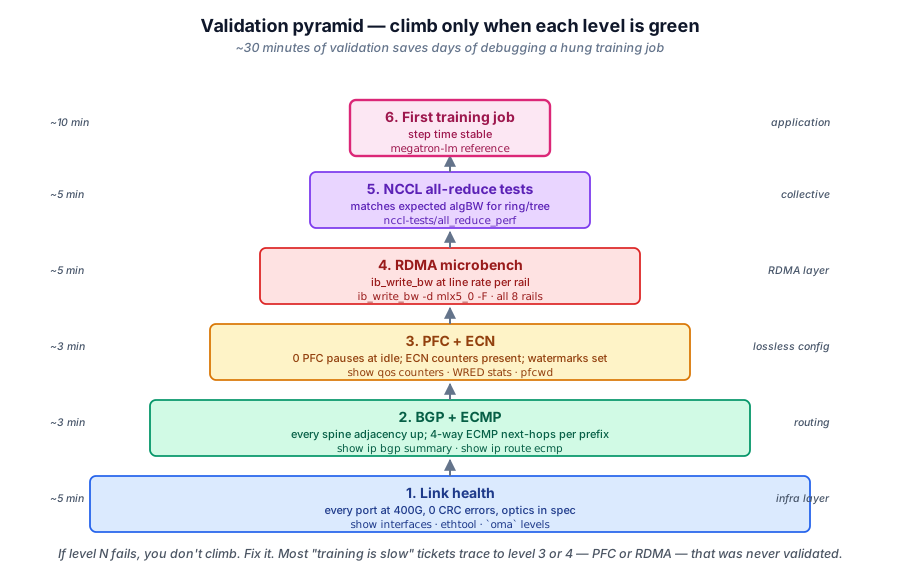
The validation pyramid
Validate bottom-up. Each layer depends on the one below.
                  ┌──────────────────┐
                  │ Real training job │   Layer 6
                  └──────────────────┘
                ┌──────────────────────┐
                │ nccl-tests AllReduce │   Layer 5
                └──────────────────────┘
              ┌──────────────────────────┐
              │ ib_write_bw  (pod-to-pod)│   Layer 4
              └──────────────────────────┘
            ┌──────────────────────────────┐
            │ PFC counters · ECN marking   │   Layer 3
            └──────────────────────────────┘
          ┌──────────────────────────────────┐
          │  BGP up · ECMP balanced          │   Layer 2
          └──────────────────────────────────┘
        ┌──────────────────────────────────────┐
        │ Links up · optics healthy · cables OK │   Layer 1
        └──────────────────────────────────────┘
If a layer fails, fix it before moving up. Don't skip a layer "because it's probably fine."
Layer 1: physical — links, optics, cables
# On every switch
show interface status
show interface counters errors

# Look for:
# - All training-fabric ports "connected" at 400G (not 200G or down)
# - Zero CRC errors, zero input/output errors in steady state
# - Optical levels in spec (typically -3 to -7 dBm RX)
What good looks like:
- 100% of ports up at the rated speed
- Zero CRC errors after a 5-minute soak
- Optical RX power within vendor-specified range
Common failure:
- One port "connected" at 100G instead of 400G — usually a transceiver mismatch or a damaged cable
- Persistent CRC errors — bad optic or cable; replace and retest
Layer 2: control plane — BGP & ECMP
show ip bgp summary
show ip route bgp
show ip route ecmp

# Look for:
# - Every spine as established BGP neighbor on every leaf
# - Every leaf prefix has 4 ECMP next-hops (one per spine)
Pinging across the fabric (server to server, not RDMA — just IP):
# From server-01 to server-32, all 8 rails
for i in 0 1 2 3 4 5 6 7; do
   ping -c 3 -I 10.5${i}.0.32 10.5${i}.0.1
done
What good looks like:
- All pings succeed
- Latency consistent (low microseconds within rack, low milliseconds across rack)
- No packet loss
Common failure:
- One rail's ping fails — check that pod's IP plan, check the NAD config
- All pings fail — BGP isn't fully converged, or ECMP isn't installing routes
Layer 3: QoS — PFC & ECN counters
Capture a baseline (no load):
show priority-flow-control counters
show qos counters
Baseline expectations: counters near zero. PFC RX/TX should be 0. ECN marks should be 0.
Now induce congestion. From a few servers, fire a ib_write_bw to one server simultaneously:
# On 8 source servers (parallel):
ib_write_bw -d mlx5_0 --duration 30 --rate_limit_type=PP \
   --bw_limit=40 <target-server-ip> &
Watch the counters on the target's leaf switch:
What good looks like:
- ECN marking activates (
ECN markedcounter rises) - DCQCN on senders dials back rates (visible via NIC
np_cnp_handledcounters) - PFC fires only briefly, if at all (PFC
TXcounter increments slowly, then stops) - No drops (
out_of_buffer_discardsstays 0)
Common failure:
- PFC fires constantly, ECN never marks —
min_thtoo high. Tune down. - ECN marks but DCQCN doesn't react — DCQCN not enabled on the NIC. Check
/sys/class/net/.../ecn/roce_rp/enable/3. - Drops happen — headroom underprovisioned or wrong PFC priority. Recheck switch config.
Layer 4: RDMA verbs — ib_write_bw pod-to-pod
Launch two test pods on different servers:
kubectl apply -f rdma-test-server.yaml
kubectl apply -f rdma-test-client.yaml
Each test pod has the same Multus + SR-IOV config as a real training pod but runs perftest binaries.
# In the server pod:
ib_write_bw -d mlx5_0 -s 65536 -F --report_gbits

# In the client pod (after server is listening):
ib_write_bw -d mlx5_0 -s 65536 -F --report_gbits <server-pod-ip-on-rail-0>
What good looks like:
| Message size | Expected throughput @ 400 G NIC |
|---|---|
| 1 KB | ~3 Gbps (limited by message rate) |
| 64 KB | ~280 Gbps |
| 1 MB+ | 350-380 Gbps (95% of line rate) |
If you don't hit 95% on large messages, something is wrong — bad cable, bad QoS, or NIC misconfig.
Repeat across all 8 rails to confirm each independently:
for nic in mlx5_0 mlx5_1 ... mlx5_7; do
   ib_write_bw -d $nic -s 1048576 -F --report_gbits <peer-pod>
done
All 8 should hit ~370+ Gbps.
Layer 5: NCCL — AllReduce throughput
nccl-tests is the gold standard for "does the whole stack work?"
git clone https://github.com/NVIDIA/nccl-tests
cd nccl-tests
make MPI=1
Run on 2-server / 16-GPU first:
mpirun -np 16 -H server-01:8,server-02:8 \
   -x NCCL_DEBUG=INFO \
   -x NCCL_IB_HCA=mlx5_0,mlx5_1,mlx5_2,mlx5_3,mlx5_4,mlx5_5,mlx5_6,mlx5_7 \
   -x NCCL_IB_GID_INDEX=3 \
   ./build/all_reduce_perf -b 8 -e 4G -f 2 -g 1
What good looks like (H100, 8 NICs × 400G per server):
| Message size | Expected algbw (algorithm bandwidth) |
|---|---|
| 1 MB | ~50 GB/s |
| 64 MB | ~200 GB/s |
| 1 GB | ~300+ GB/s |
| 4 GB | ~330 GB/s |
If you're seeing half these numbers, GPUDirect RDMA isn't active:
lsmod | grep nvidia_peermem # must be loaded
Other typical issues:
- NCCL using only 1 NIC →
NCCL_IB_HCAenv var missing or wrong - "WARN: skipping ..." in NCCL_DEBUG output → check the warning, usually a topology file issue
Once 2-server works, scale up: 4 servers, 8 servers, full pod. Throughput should stay close to per-server numbers (slight degradation due to AllReduce overhead).
Layer 6: a real training step
The capstone test: run a real training framework, measure step time.
For a 175 B-parameter model on 256 GPUs:
# Using NVIDIA's Megatron-LM reference benchmark
docker run --gpus all -it \
   nvcr.io/nvidia/pytorch:24.10-py3 bash

# Inside container:
cd /workspace/Megatron-LM
torchrun --nproc_per_node=8 --nnodes=32 --node_rank=$NODE_RANK \
   --master_addr=$MASTER_ADDR --master_port=29500 \
   pretrain_gpt.py \
   --tensor-model-parallel-size 8 \
   --pipeline-model-parallel-size 4 \
   --num-layers 96 --hidden-size 12288 \
   --seq-length 2048 --global-batch-size 1536 \
   --train-iters 100
What good looks like:
- Step time stable across iterations (variance < 5%)
- Step time within ~10% of theoretical (depends on model, framework efficiency)
- No NCCL timeouts
- Per-rank progress logged consistently
Capture a baseline. The first 100 training steps from a clean cluster build = your reference for everything that follows.
When validation fails, where to look
A symptom → likely cause cheat sheet:
| Validation step | Symptom | First place to check |
|---|---|---|
| Layer 1 | Port at 100G instead of 400G | Transceiver mismatch (NIC vs switch optic) |
| Layer 2 | ECMP shows 1 path instead of 4 | BGP maximum-paths config on the leaf |
| Layer 3 | Drops despite PFC | Headroom underprovisioned (cable length mismatch) |
| Layer 4 | ib_write_bw low | DCQCN not enabled, or wrong DSCP / SL config |
| Layer 5 | NCCL slow | GPUDirect not active (nvidia_peermem missing) |
| Layer 6 | Step time varies wildly | One slow rank → check NUMA, check rail health |
The "go live" gate
Before declaring the cluster production-ready:
✓ Layer 1 — 100% ports up, 0 CRC errors after 1-hour soak
✓ Layer 2 — All BGP up, ECMP balanced, full mesh ping pass
✓ Layer 3 — PFC + ECN baselines captured, ECN responds to induced load
✓ Layer 4 — ib_write_bw hits >350 Gbps on all 8 rails
✓ Layer 5 — nccl-tests AllReduce within 15% of expected at full pod scale
✓ Layer 6 — A real training job ran for >24 hours with stable step time
✓ Telemetry plumbing — Grafana dashboards capture the five golden signals
Skip any check at your peril.
Go / no-go checklist
Your job before declaring the cluster live: walk this table top to bottom and tick every box. One unchecked row is a no-go — fix it, don't wave it through. Run these from any host in the pod (and one switch in the path) after the layers above pass.
| ✅ | Check | Command | Expected | If it fails |
|---|---|---|---|---|
| ☐ | BIOS: VT-d/IOMMU + SR-IOV + ACS on | dmesg | grep -i iommu | Shows IOMMU enabled (no VF passthrough without it) | Configure the hosts → Phase 1: BIOS settings |
| ☐ | Kernel params: hugepages + iommu=pt | cat /proc/meminfo | grep Huge | HugePages_Total: 64 (64 × 1 GB reserved) | Configure the hosts → Phase 2: Kernel command line |
| ☐ | RDMA driver loaded, all rails present | rdma link then ibstat | 8 mlx5_N devices, every port State: Active (not Down) | Configure the hosts → Phase 3: NIC driver + RDMA core |
| ☐ | GPUDirect RDMA active | lsmod | grep nvidia_peermem | Module loaded (amd_peer_mem on AMD) — missing halves NCCL throughput | Configure the hosts → Phase 3 |
| ☐ | Links up at rated speed, clean | show interface status · show interface counters errors | 100% ports connected at 400G, 0 CRC errors after a 5-min soak | Layer 1: physical |
| ☐ | BGP up, ECMP balanced | show ip bgp summary · show ip route ecmp | Every spine Established, every leaf prefix has 4 next-hops | Layer 2: control plane |
| ☐ | PFC/ECN counters sane at idle | show priority-flow-control counters · show qos counters | PFC RX/TX and ECN marks near 0 at idle; out_of_buffer_discards 0 | Layer 3: QoS |
| ☐ | ib_write_bw at line rate, all 8 rails | ib_write_bw -d mlx5_0 -s 1048576 -F --report_gbits <peer> | >350 Gbps per rail (95% of 400G), all 8 rails pass | Layer 4: RDMA verbs |
| ☐ | nccl-tests AllReduce at expected busbw | ./build/all_reduce_perf -b 8 -e 4G -f 2 -g 1 | ~330 GB/s algbw at 4 GB, within 15% of expected — half means GPUDirect off | Layer 5: NCCL |
| ☐ | No PFC storms under load | run parallel ib_write_bw, watch leaf PFC TX | ECN marks rise and DCQCN backs off; PFC TX blips then stops, 0 drops | Layer 3 · Production Operations |
| ☐ | Telemetry plumbed | check Grafana | Five golden signals landing for every host and switch in the pod | Production Operations |
All boxes checked is the only state that ships. If a row is red, you go back to the layer it links to — you do not climb past a failing gate.
💡 What you should remember
| # | Concept | Why it matters | |
|---|---|---|---|
| 1 | 🔬 | Validate bottom-up. | Each layer depends on the one below. |
| 2 | 📊 | Capture a baseline before going live. | Without it, you can't tell "broken" from "normal." |
| 3 | ⚠️ | The most common bug | is GPUDirect not active — easy to miss, halves throughput. |
| 4 | ✅ | ib_write_bw proves the wire works. | nccl-tests proves the stack works. A real training job proves they work together. |
| 5 | ⏱️ | 30 minutes of validation saves days of debugging | when a real job starts misbehaving. |
You're done. Cluster is built, configured, and validated. Head back to the curriculum index, or jump to Production Operations to set up the monitoring and incident response that keeps this running.