Host Networking
The question this page answers: how does an application running inside a Kubernetes pod get RDMA access to the NIC — and in what order do you configure it?
This is the build-time map of the host stack. Each layer is taught in depth in Phase 5's Host Networking section — this page names the pieces, shows how they stack, and gives you the deployment order you have to get right.
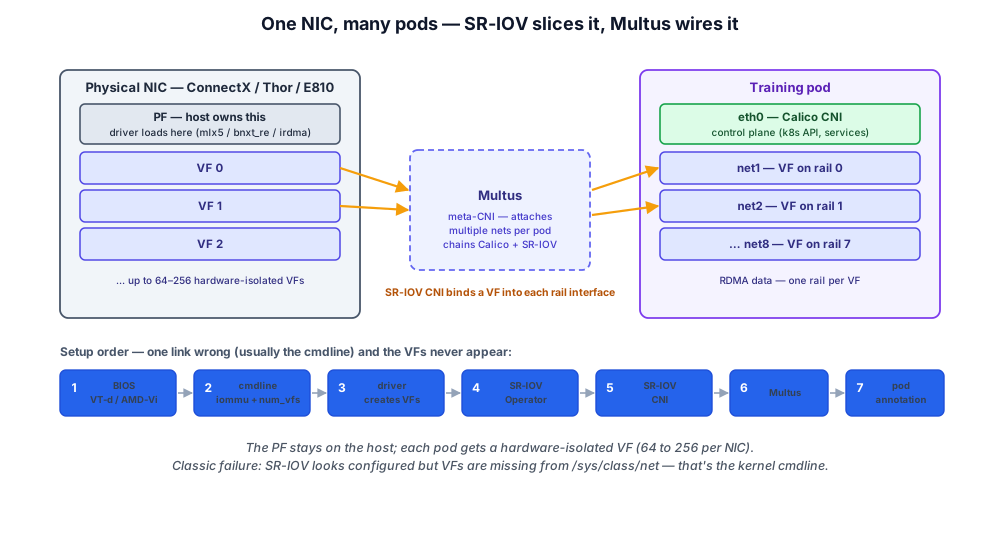
- See the whole host-network stack on one diagram — one physical NIC sliced into VFs, Multus wiring them into the pod, and the drivers the Operators manage.
- Get the deployment order right — the seven-step dependency chain from BIOS to pod annotations, and why one link out of order costs you hours.
- Know where the depth lives — this page is the map; Phase 5's Host Networking section is the territory, one page per layer.
The whole picture on one page — one physical NIC sliced into VFs, Multus wiring them into the pod, and the setup order you have to get right. The table below names each piece and points to where the mechanics live.
The stack, in one pass
Getting RDMA into a pod is four moving parts stacked on top of each other. Here's what each does — and where to go for the mechanics, the commands, and the failure modes.
| Layer | What it does | Deep dive |
|---|---|---|
| PF / VF | The NIC (ConnectX‑7/8, Thor, E810) exposes one Physical Function — the host owns it and loads the RDMA driver against it — plus 64–256 hardware‑isolated Virtual Functions, one VF per pod, each with its own queue pairs and DMA. | 12.1 SR-IOV Mechanics |
| SR-IOV | The PCIe mechanism that creates the VFs. Setup chain: BIOS VT‑d / AMD‑Vi → intel_iommu=on → driver num_vfs=N → SR‑IOV Network Operator → SR‑IOV CNI. The classic failure — VFs never appear in /sys/class/net/ — is almost always the kernel cmdline. | 12.1 SR-IOV Mechanics |
| Multus | The meta‑CNI that gives a pod more than one interface: eth0 (Calico, k8s control plane) plus net1..net8 (one SR‑IOV VF per rail), wired via the k8s.v1.cni.cncf.io/networks annotation and NetworkAttachmentDefinitions. With rail‑optimized topology this maps GPU‑N to Rail‑N naturally. | 12.2 Multus & Multi-NIC Pods |
| GPU + Network Operator | NVIDIA's Operators that automate the driver / VF / device‑plugin chain — GPU Operator for the NVIDIA driver, container hook, DCGM, and NFD; Network Operator for the mlx5 OFED driver and the RDMA shared‑device plugin. Together they take a node from bare hardware to "ready to schedule RDMA + GPU pods." | 12.6 Provisioning the GPU Host |
One naming trap worth burning in: OFED is the vendor‑agnostic rdma-core stack; "MLNX_OFED / NVIDIA OFED" is just NVIDIA's packaging of it for the mlx5 family. The vendor‑specific part isn't the RDMA stack — it's the GPU driver (CUDA for NVIDIA, ROCm for AMD). Broadcom (Thor) and Intel (E810) use inbox rdma-core or a vendor package instead of the Network Operator.
The order that has to be right
The pieces above only work if you bring them up in dependency order. Any link out of order and you'll spend hours debugging:
- Hardware enabled — BIOS VT-d / AMD-Vi on, all firmware updated
- OS configured — IOMMU, hugepages, RDMA core packages installed
- GPU Operator deployed — installs the NVIDIA driver
- Network Operator deployed — installs Mellanox OFED, sets up VFs
- Multus installed — meta-CNI plugin
- NetworkAttachmentDefinitions created — one NAD per rail
- Pod spec uses the right annotations — Multus reads them, schedules VFs
For first-time setups, budget a week to get this right end-to-end. For repeat setups with automation: minutes. The runnable, copy-paste version of this sequence is the Cluster Build Guide § Configure the Hosts + Kubernetes; the per-layer mechanics and debug tips are in Phase 5 § Host Networking.
💡 What you should remember
| # | Concept | Why it matters | |
|---|---|---|---|
| 1 | 🔌 | PF is the physical NIC (host owns it). | VF is a hardware-isolated slice (pod gets it). |
| 2 | 🧩 | SR-IOV is the PCIe mechanism. | Requires BIOS + kernel + driver + Operator + CNI all configured. |
| 3 | 🌐 | Multus gives a pod multiple interfaces | needed because RDMA traffic goes through a different NIC than the k8s control plane. |
| 4 | 🎛️ | GPU Operator + Network Operator automate the driver / VF / plugin stack. | Don't try to do this by hand at scale. |
| 5 | ⚠️ | The setup chain has many ordered steps. | Most production debugging is "which step was misconfigured?" |
Next: Inference Networking → — why serving a trained model is a different network problem than training it: latency-critical request/response, KV-cache movement, and a fabric design that diverges from the training fabric.